
Ecommerce Product Image Size and Quality Requirements
Ecommerce product image requirements are destination-specific: an image must meet the platform or placement’s technical limits for pixel dimensions, aspect ratio and file size while preserving enough sharpness and fine detail for the intended display or zoom. Minimum acceptance is not the same as recommended quality; use the current destination specification for hard limits, then judge visible quality at the actual viewing size.
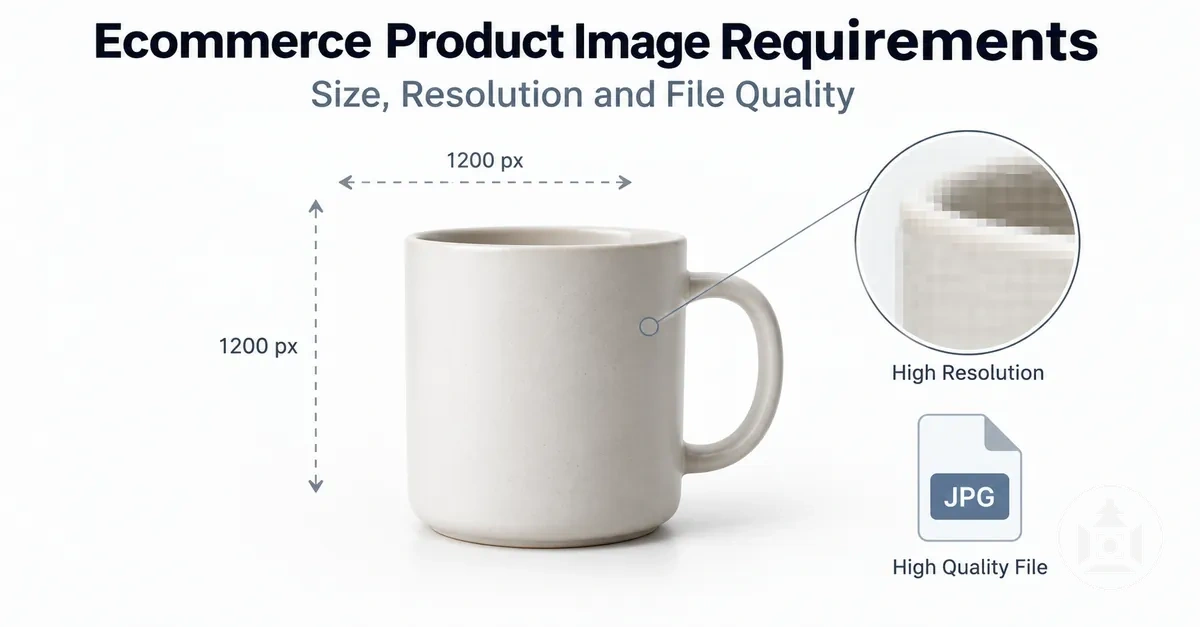
Product image requirements: verification matrix
Use this sequence to decide whether a source image is ready for its intended ecommerce placement. Technical limits come from the current destination specification; visible quality is judged at the display or zoom size the customer will actually use.
- Destination and placement
- Use the current platform and placement specification. It defines which minimums, maximums, aspect-ratio rules, file-size caps and feature conditions apply.
- Pixel dimensions
- Pass the applicable acceptance range and provide enough source pixels for the intended display or zoom. PPI or DPI metadata does not add screen pixels.
- Aspect ratio
- Use a ratio that fits the destination frame without unacceptable cropping or excess whitespace. A 1:1 ratio means equal width and height; other ratios change the frame shape.
- File weight and compression
- Stay within any hard upload cap while reducing file weight only as far as product detail remains usable. Visible blocking, ringing, banding or softened detail signals excessive compression for that viewing condition.
- Sharpness and fine detail
- Edges, textures, small text and product features needed for inspection should remain distinguishable at the intended size. Sharpening can change edge contrast but cannot recreate missing source detail.
- Final decision
- Ready for upload only when all applicable technical limits pass and visible quality supports the required product inspection. If one source image serves several placements, judge it against the most demanding placement it must support.
This matrix is a verification framework, not a universal pixel-dimension or file-size standard; platform values and feature thresholds can change.
Start with the intended upload location, then evaluate the source image against the most demanding placement it must serve, especially when a larger product-page view or zoom requires closer inspection.
Pixel dimensions determine the available width and height in pixels and set an upper bound on how much spatial detail can be represented; they do not guarantee sharpness or captured detail. Aspect ratio affects how the product fits within the required frame or crop.
File size and compression affect file weight and can also affect visible quality when compression removes noticeable detail.
Platform requirements can set different upload limits or recommendations for different placements and features, while zoom can require more usable image detail than basic image acceptance.
Minimum acceptance and recommended quality are different states: an image can satisfy an upload requirement yet provide less detail than is desirable for a larger placement or zoom.
The appropriate specification therefore depends on the destination, its applicable limits or recommendations, and the image function being supported.
Table of Contents
Pixel Dimensions, Resolution and Aspect Ratio
Pixel dimensions, resolution and aspect ratio are related but non-equivalent properties of an ecommerce product image.
Pixel dimensions state the image width and height in pixels, while resolution terminology can describe pixel density or associated resolution metadata.
Aspect ratio describes the proportional relationship between width and height and therefore the shape of the image frame.
Pixel dimensions determine how many pixels are available across the width and height, so larger dimensions provide a larger pixel grid in which image detail can be represented.
PPI or DPI metadata can change without adding pixels when the pixel dimensions remain unchanged.
Aspect ratio changes when the proportional relationship between width and height changes, which alters frame shape and can lead to cropping or whitespace when a placement uses a different ratio.
The diagram labels the pixel width and height, pixel-grid detail, resolution metadata and aspect-ratio frame on one product image so the three properties can be distinguished visually.

The table separates the three related properties by what each measures, what changes with it and the resulting ecommerce implication.
| Property | What it measures | What changes when it changes | Ecommerce implication |
|---|---|---|---|
| Pixel dimensions | Width and height in pixels | The number of pixels across the image width or height | Changes the pixel grid available to represent image detail |
| Resolution terminology | Pixel density or associated resolution metadata, depending on context | PPI/DPI metadata can change without changing pixel dimensions | Must be interpreted separately from the actual width and height in pixels |
| Aspect ratio | The proportional relationship between width and height | The shape of the image frame | A different placement ratio can require cropping or whitespace |
For example, a 1000 × 1000 image contains 1,000,000 pixels, while a 2000 × 2000 image contains 4,000,000 pixels. Doubling both dimensions therefore produces a fourfold pixel-count increase while the 1:1 aspect ratio remains unchanged.
Changing only its PPI metadata while retaining the same width and height in pixels likewise does not create additional pixels, so pixel dimensions, resolution terminology and aspect ratio remain distinct properties.
Minimum, Recommended and Zoom-Ready Pixel Dimensions
Minimum dimensions, recommended dimensions and zoom-ready dimensions are different pixel-dimension requirement states, and their actual pixel thresholds depend on the platform, placement or feature being used.
Minimum dimensions define the threshold for upload acceptance under the applicable specification, while recommended dimensions target more usable visible detail than basic acceptance alone.
Zoom-ready dimensions describe the source-image dimensions needed to support close inspection when the platform's zoom functionality has its own requirements.
No single pixel threshold can reliably represent all three states across ecommerce platforms and placements.
A platform may accept an image at its minimum size while recommending larger dimensions for visible detail, and zoom functionality may require a different threshold or sufficient source-image detail.
Platform-specific pixel values therefore need to be checked against the applicable specification rather than treated as universal dimension criteria.
The three criteria classify a dimension value by its functional role:
- Minimum: the minimum dimensions meet the applicable pixel threshold for upload acceptance, but acceptance alone does not establish suitability for enhanced detail.
- Recommended: the recommended dimensions exceed basic acceptance where the applicable guidance calls for more source pixels to support visible detail, without guaranteeing a particular display result.
- Zoom-ready: the zoom-ready dimensions meet the applicable zoom threshold or source-image requirement for zoom functionality, with the actual requirement determined by the platform or placement.
The comparison graphic uses the same product and framing across the three functional states, allowing available detail for close inspection to be compared without presenting the states as universal numeric standards.

Resolution and Its Relationship to Pixel Dimensions
Image resolution in screen-based ecommerce use is primarily described by the pixel dimensions available to represent the image: its pixel width and pixel height.
Those dimensions define the image's pixel grid and therefore the number of source pixels available for screen detail.
The diagram isolates that pixel-grid information from PPI or DPI metadata by showing the same product image with identical pixel dimensions but different density metadata.
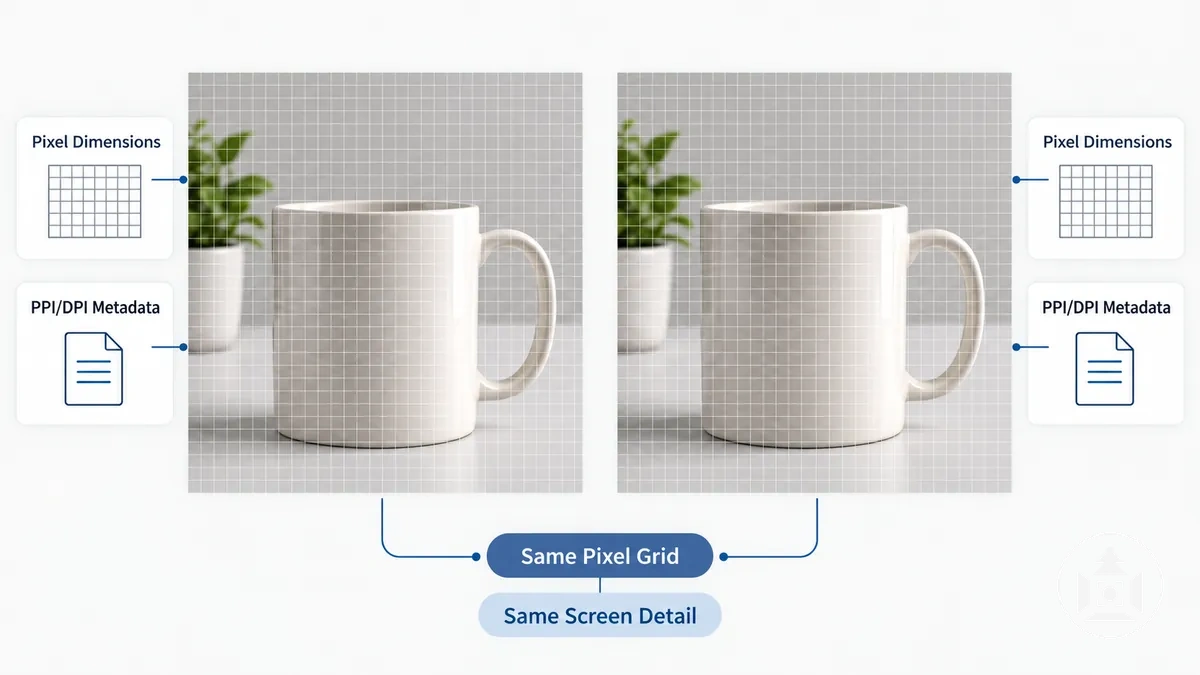
PPI records pixels per inch, while DPI terminology may also appear in image metadata or related output contexts; neither value by itself creates additional screen pixels when the pixel dimensions remain unchanged.
For example, two copies of the same image can retain identical pixel width and pixel height while carrying different PPI or DPI metadata values, yet the underlying pixel grid remains the same.
Software or output workflows may interpret density metadata for physical sizing, but for the screen-based distinction here, pixel dimensions describe the available pixels and the metadata describes density information rather than additional screen detail.
Aspect Ratio and Image Cropping
Product image aspect ratio is the proportional width-to-height relationship of an image, and that relationship determines its frame shape.
A 1:1 aspect ratio produces a square frame, while a different ratio produces a frame with different proportions.
When a product image and its destination placement use different frame shapes, fitting the image can require cropping or leave whitespace around the subject.
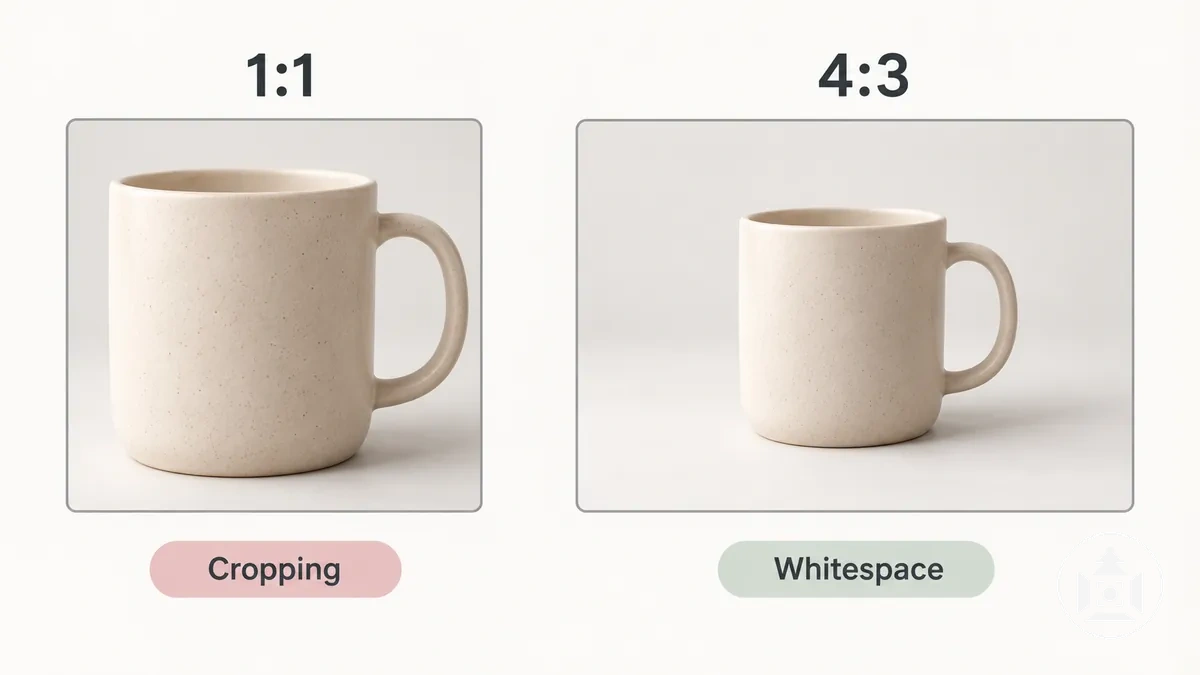
For example, the same product can fit within a 1:1 square frame with one amount of surrounding space but appear differently when placed in a 4:3 frame at a consistent product scale.
If the source image is fitted without clipping the product, the changed frame shape may leave different whitespace; if the placement fills its frame, parts of the source image may instead be cropped.
The suitable aspect ratio therefore depends on the destination placement and its frame requirements rather than one universal ratio.
File Size and Compression Requirements
Product image file size should be low enough to satisfy the applicable upload limit and page delivery constraint while retaining the detail needed for the intended display.
File size describes the file weight, whereas compression is a data-reduction mechanism that can reduce that weight.
There is no universal kilobyte target for this trade-off because an acceptable file weight depends on the destination constraints and the visible image quality required.
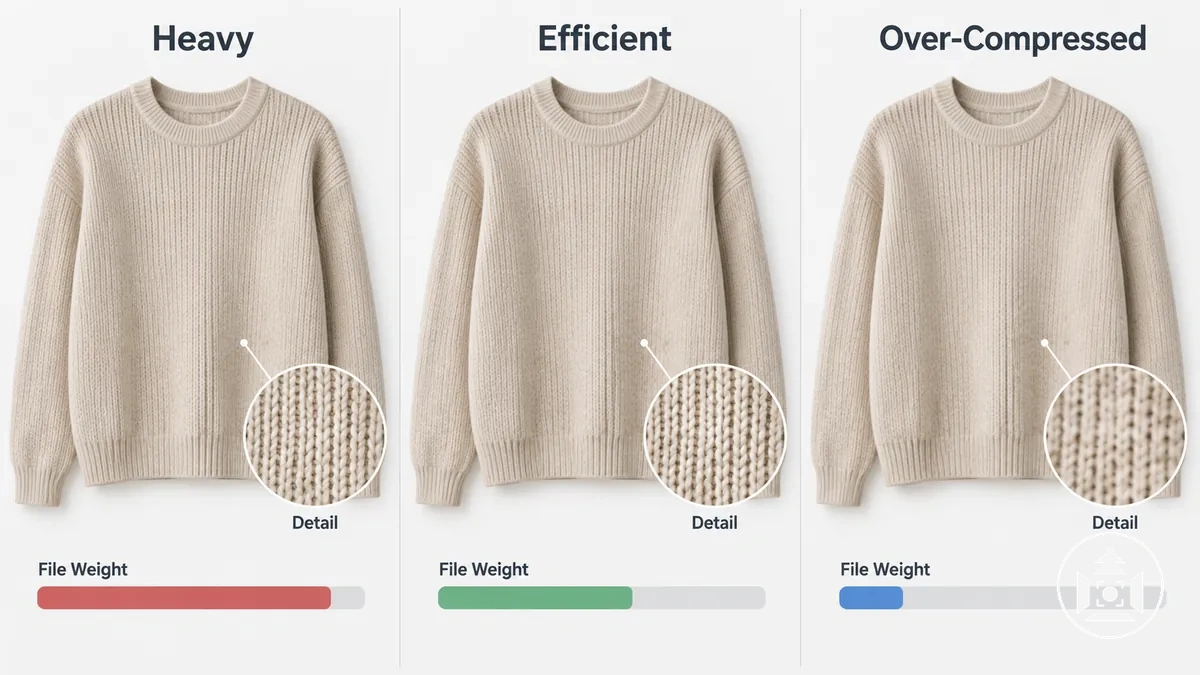
Increasing the compression level can reduce file weight, but lossy compression can also discard image information and introduce visible compression artifacts.
The practical limit is reached when further data reduction removes product detail or creates artifacts that matter at the intended display size.
The table organizes three relative file states by compression level, visible quality risk and practical implication rather than assigning fixed universal file-size targets.
| File state | Compression level | Visible quality risk | Practical implication |
|---|---|---|---|
| Unnecessarily heavy | Less data reduction than needed for the display requirement | Low compression-related risk, with file weight that may exceed what the intended display needs | May consume more data during page delivery or exceed an applicable upload limit |
| Efficiently compressed | Enough data reduction to lower file weight while retaining required detail | No material compression artifacts visible at the intended display size | Satisfies the relevant file constraint while maintaining suitable image quality for the intended use |
| Over-compressed | More data reduction than the image can tolerate for the intended display | Visible detail loss or compression artifacts | Achieves lower file weight at the expense of product-image clarity |
Under the same display requirement, these states range from carrying more data than needed, through useful data reduction with retained detail, to compression that produces visible quality loss.
Compression behaviour and resulting file weight can also depend on format, which is a separate decision covered under ecommerce image file formats.
The useful target is therefore a file that satisfies the applicable upload or page delivery constraint without unacceptable visible loss, not one universal file-size value.
File Size Limits and Upload Constraints
An ecommerce image file-size limit can represent different kinds of constraints: a hard upload cap that determines acceptance, a recommended target that guides working file weight, or a performance target intended to support page delivery.
The hard upload cap is binding for the applicable platform or placement, while recommended and performance targets are advisory unless the platform specification states otherwise.
No single maximum file size can be treated as universal because the applicable value is defined by the current platform or placement specification.
The three criteria should therefore be interpreted by what each value controls and what happens when the file crosses it:
- Hard limit: the upload cap is the maximum accepted file weight under the applicable platform specification; a file above that cap can be rejected, so the current specification controls upload success.
- Recommended target: the recommended target is an advisory working value used when guidance calls for a lower file weight than the hard limit while retaining suitable image quality; meeting it does not replace the hard acceptance check.
- Performance target: the performance target is a context-dependent file-weight goal chosen for page delivery rather than upload acceptance; its appropriate value depends on the delivery context and should not be treated as a universal threshold.
Actual file-size limits and advisory targets can differ by platform, placement and specification date, so current documentation is required before assigning a numeric value.
For example, two product images can have the same pixel dimensions yet different file weights because file weight also depends on image content, file format, compression settings and metadata. One may therefore satisfy an applicable upload cap while the other exceeds it.
File-size limits and pixel dimensions must therefore be checked separately when evaluating image compliance.
Compression and Visible Quality Loss
Product image compression reduces file weight by storing image information more efficiently, and the amount of retained detail depends on the compression method and intensity.
Lossy compression removes some image data to achieve greater data reduction, so stronger settings can introduce visible quality loss.
Lossless compression reduces file weight without discarding the encoded image information, but it may produce less reduction than a lossy method for the same image.
Compression artifacts become important when they interfere with product inspection rather than merely existing at a technical level.
Blocking can appear as visible square regions, ringing can form halos near high-contrast edges, banding can replace smooth tonal transitions with visible steps, and excessive compression may produce softened edges or weakened texture.
These effects are easier to recognise around detailed product edges, fine surface texture or small printed features where retained detail matters.
The following states compare relative visible compression rather than fixed quality percentages:
- Low visible compression: product edges, texture and small features remain visually intact, with no material compression artifacts apparent at the intended viewing size.
- Moderate visible compression: some fine detail may soften or minor artifacts may appear, but the product remains suitable for inspection when those changes do not obscure meaningful features.
- Excessive visible compression: blocking, ringing, banding or softened edges become obvious enough to distort product detail and reduce confidence in close inspection.
When visible quality loss is traced to export or post-processing choices, corrective work belongs within the broader task of editing product images rather than this compression diagnosis itself.
The practical boundary is reached when further file-weight reduction removes or distorts detail that matters at the intended ecommerce viewing size.
Image Quality Requirements Beyond Pixel Count
Ecommerce product image quality requires more than meeting a pixel-dimension threshold.
Technical compliance can make an image acceptable for upload while sharpness, fine detail, scaling quality or compression artifacts still limit its visible quality.
An accepted image is visually usable only when the product detail needed at the intended display or inspection size remains clear enough to inspect.
Visible quality checks therefore evaluate different properties from dimensional compliance.
The four criteria below connect each quality attribute with an observable signal and its implication for product inspection.
Sharpness and retained fine detail concern whether relevant edges, textures and small features remain distinguishable, while scaling quality and compression artifacts concern whether processing or display conditions reduce that usable detail.
The importance of each criterion depends on the intended display size and whether close product inspection is required.
- Sharpness: product boundaries and important edges should remain sufficiently defined at the intended viewing size; visibly softened edges can make shape or small features harder to inspect.
- Retained fine detail: relevant texture, surface features and small product details should remain distinguishable when the placement or zoom condition requires them; lost detail reduces the information available for close inspection.
- Scaling quality: displaying an image beyond the detail supported by its available pixels can produce softer or less distinct detail through resampling or interpolation; the practical criterion is whether useful detail remains visible at the intended display size.
- Compression artifacts: visible blockiness, ringing, banding or degraded edge quality indicate that compression artifacts are affecting image information; they become a usability problem when they obscure product detail at the intended viewing size.
For example, an image can meet an upload's pixel-dimension requirement yet remain technically accepted but visually poor if its product edges are soft and fine texture is no longer distinguishable at the intended inspection size.
Lighting, colour, composition and other capture factors belong to the broader discipline of ecommerce product photography; here, the boundary is whether technical compliance also leaves the image visually usable for product inspection.
Sharpness and Fine Product Detail
Product image sharpness is sufficient when the fine detail needed for the intended display size or zoom remains visibly distinguishable.
Edge definition should remain clear enough to separate important product boundaries and small features, while texture should retain the detail needed for product inspection.
A larger display or closer zoom can reveal limitations that are less apparent at a smaller viewing size, so adequacy should be judged under the intended viewing condition.
Small text should remain recognisable when reading it is relevant to product inspection, and seams should retain enough edge definition to distinguish their shape and construction.
Fine texture should remain visibly differentiated rather than merging into an indistinct surface, while small product features should remain identifiable at the required display size or zoom state.
These observable cues show whether the product image retains adequate fine detail for its intended use without identifying the cause of any softness.
Digital sharpening can change apparent edge contrast, but it does not substitute for source detail that is absent from the image.
How Image Requirements Change by Platform and Placement
The same source product image can face different image requirements when its destination platform or placement changes.
A platform can set general upload requirements, while a particular placement can impose different conditions for how the image is displayed or which features it supports.
An image that is suitable for one destination therefore does not establish a specification for another; the applicable requirements come from the platform and placement being used.
The requirement set commonly changes across four variables, with the applicable state determined by the destination specification and display role:
- Dimensions: a platform or placement may set minimum, maximum or recommended pixel dimensions according to its acceptance or display conditions.
- Aspect ratio: a placement may require or recommend a particular frame proportion, affecting how the source image fits or is cropped for that display context.
- File-size limits: platform-level upload requirements can impose a hard maximum file weight, while advisory targets may be used separately from the acceptance limit.
- Feature support: a product-page placement may apply additional image conditions when zoom support or another detail-viewing feature is available.
Current platform documentation should control time-sensitive numerical requirements because platform specifications and placement conditions can change, and detailed values should be verified for the destination in use.
Hard upload limits determine technical acceptance when specified, whereas recommendations describe preferred conditions rather than an equivalent universal requirement.
Platform Minimums, Maximums and Recommended Dimensions
Platform minimum, maximum dimensions or an upload ceiling, and recommended dimensions serve different functions and must be read in the context of a specific platform and source date.
Amazon Seller Central states that product images must be 500 to 10,000 pixels on their longest side and prefers images larger than 1,000 pixels on the longest side for zoom support.
eBay requires listing images to be at least 500 × 500 pixels and recommends at least 1600 × 1600 pixels, while Etsy recommends listing images of at least 2000 × 2000 pixels and separately identifies a 635 × 635-pixel condition for the first listing photo.
The table separates acceptance, ceiling and recommendation criteria rather than treating them as one cross-platform specification.
| Platform | Minimum dimensions | Maximum dimensions or upload ceiling | Recommended dimensions | Feature implication | Source date |
|---|---|---|---|---|---|
| Amazon | 500 px on the longest side | 10,000 px on the longest side | Larger than 1,000 px on the longest side | Amazon associates the recommendation with zoom support; it is distinct from the 500 px acceptance minimum | Amazon Seller Central, accessed 7 September 2026 |
| eBay | 500 × 500 px | No maximum is listed here; verify the current eBay upload ceiling before submission | At least 1600 × 1600 px | The minimum is an image requirement, while 1600 × 1600 px is a separate recommendation for higher-resolution listing photos | eBay Help and Seller Center, accessed 7 September 2026 |
| Etsy | No general upload minimum is listed here; the first listing photo should be at least 635 × 635 px to avoid the stated search-visibility consequence | No upload ceiling is listed here; verify Etsy’s current limit before submission | At least 2000 × 2000 px for listing photos | The 635 × 635-pixel condition applies to the first listing photo, while 2000 × 2000 px or more is Etsy's listing-photo recommendation | Etsy Help, accessed 7 September 2026 |
Current official documentation should be checked with its source date because dimension limits, recommendations and feature support such as a zoom threshold can change.
A platform minimum, maximum or upload ceiling and recommended dimensions should retain their original roles and platform scope rather than being merged with values from other platforms into a synthetic standard.
Product Grid, Product Page and Zoom Image Requirements
The same source image can serve a product grid, a full product page and a zoom image, but each placement uses that image differently.
A product grid typically renders the image at a smaller size for rapid scanning, a product page presents it at a larger display size, and a zoom or close-detail view places greater demand on source detail.
The applicable ecommerce image placement requirements therefore change with the display role rather than following one universal placement size.
The main differences are rendered size, crop behaviour and detail demand.
A product grid may scale the image down and may crop it to fit the grid frame, while a product page generally displays a larger version where edge and texture detail become more visible.
A zoom image can require more source pixels because close inspection may expose detail limitations that are less noticeable at smaller rendered sizes.
The table compares these roles qualitatively so source dimensions and aspect-ratio considerations can be evaluated without implying fixed platform-wide values.
| Placement | Display role | Typical crop or scale behaviour | Detail demand | Source-image implication |
|---|---|---|---|---|
| Product grid | Compact listing view for scanning multiple products | Typically scaled down and may be cropped to fit the grid frame | Lower relative detail demand because the image is viewed at a smaller rendered size | The source image should retain clear subject recognition at the smaller render and fit the placement's aspect ratio without problematic cropping |
| Product page | Larger primary product display | Rendered larger than the grid view, with crop behaviour determined by the page frame | Greater detail demand because edges, texture and small features are more visible | The source dimensions should support the larger display while preserving useful product detail |
| Zoom image | Close-detail inspection | Uses a magnified or enlarged view of the source image, with less tolerance for insufficient source detail | Highest relative detail demand among these three display roles | The source image can require greater pixel detail and suitable framing so close inspection does not reveal inadequate detail |
A source image that appears adequate in a product grid can become visibly insufficient when the same file is used for a larger product page or zoom state.
Source dimensions and aspect ratio should therefore be judged against the most demanding placement the image must serve, while the exact requirement remains conditional on the destination platform and display implementation.
Checking Product Images Against Upload Requirements
Product image upload verification requires checking both technical acceptance and visible quality against the intended platform or placement.
Verify the current upload requirements before submission, then use the checklist to confirm that each image meets the relevant pass condition without assuming a universal value.
- Destination and platform specification: Verify the current platform specification and placement requirement for the image being uploaded. Pass when the image is being checked against the correct destination-specific rules; if the applicable requirement is unclear or time-sensitive, confirm the current specification before upload.
- Pixel dimensions: Compare the image's pixel dimensions with the required minimum, maximum or recommended dimensions for the intended placement. Pass when the dimensions fall within the applicable acceptance range and satisfy any relevant display requirement; otherwise use a compliant source image or export at supported dimensions without inventing detail.
- Aspect ratio: Check whether the image ratio matches or can fit the intended placement without unacceptable cropping or excess whitespace. Pass when the product remains appropriately framed under the placement's aspect-ratio condition; otherwise correct the crop or export dimensions where the available source image allows it.
- File-size cap: Compare the image file weight with the applicable file-size cap or upload ceiling. Pass when the file remains within the stated limit; if it exceeds the cap, reduce file weight through an appropriate export or compression adjustment while preserving necessary visible detail.
- Compression artifacts: Inspect product edges, texture and tonal transitions at the intended viewing size for blocking, ringing, banding or other visible compression artifacts. Pass when compression does not materially obscure product detail; otherwise revise the export or compression setting.
- Sharpness and detail: Check sharpness, edge definition, texture, small text and other fine detail relevant to product inspection. Pass when the required detail remains distinguishable at the intended display size; if important source detail is absent, use a better source image rather than relying on additional sharpening.
- Placement-specific zoom requirement: If the destination uses zoom or close-detail viewing, verify any additional source-dimension or detail requirement specified for that feature. Pass when the image meets the applicable zoom condition and retains sufficient detail for close inspection; otherwise provide a more suitable source image.
- Final readiness confirmation: Confirm that all applicable checks above pass together for the intended destination. The image is ready for upload when the relevant technical limits are satisfied and no visible-quality issue prevents the required product inspection.
File weight, aspect ratio and some compression problems can often be corrected during export or editing when the source image already contains sufficient usable detail.
Missing fine detail, inadequate source dimensions or unresolved softness may require a better original rather than another export adjustment.
When the source-image problem comes from capture quality, the corrective boundary moves to setting up an ecommerce product shoot so the next source image can meet the required inspection and upload conditions.