
Ecommerce Product Photography
Ecommerce product photography coordinates lighting, background, camera position, focus, exposure and restrained editing to create product images that support online evaluation. A listing image set is ready when it shows decision-relevant features clearly, represents the product faithfully, stays consistent across comparable views and meets the destination's current file requirements; the required shot count and settings depend on the product and listing purpose rather than a universal recipe.

Ecommerce product photography: five quality gates from setup to publishing
Use these five gates to connect the product, the intended listing information and the final publication decision. Each gate states what should be controlled and what “ready” means.
-
1
Plan the visual coverageIdentify the overall form, important features, variants, alternate sides, detail, scale or context that shoppers need to inspect.Ready when every planned view has a clear informational purpose.
-
2
Adapt the setup to the productUse lighting, background, support and viewpoint according to reflectivity, transparency, texture, colour, size, shape and fine detail.Ready when the setup makes the required product characteristics distinguishable without misleading distortion.
-
3
Capture repeatablyKeep product placement, camera position and intended lighting stable across comparable images; verify focus, exposure, framing and visible detail before changing the setup.Ready when the captured files contain the information the image set was planned to show.
-
4
Edit without changing the productCorrect crop, alignment, colour or tone when needed and clean background distractions, but do not invent or alter decision-relevant colour, shape, texture or features.Ready when editing improves presentation while preserving a faithful product representation.
-
5
Validate before publishingCheck product accuracy, usable sharpness, colour fidelity, set consistency, technical file condition, destination compatibility and shot coverage together.Ready when no decision-relevant visual question remains unresolved and the files meet the listing destination's requirements.
Publication rule: if a required feature is missing, unclear or inaccurately represented, correct the responsible capture or editing issue—or add the necessary view—before publishing.
The primary informational purpose of ecommerce product photography is to represent the product with sufficient clarity to make visible details understandable, sufficient accuracy to avoid misleading representation, and sufficient consistency across related product photos.
Image quality therefore concerns how reliably the images communicate the product's visible characteristics in the listing context.
That representation depends on coordinated control across setup, capture and post-capture preparation.
Lighting, background and product placement can affect visible detail and colour appearance; capture choices can affect focus, exposure and framing; and editing can refine the resulting ecommerce imagery while preserving an accurate representation of the product.
The appropriate choices vary with product characteristics and listing requirements, but the combined objective remains clear, accurate and consistent product images rather than reliance on any single technique.
Table of Contents
What Ecommerce Product Photography Is and Its Role in Online Product Evaluation
Ecommerce product photography is the creation of product images specifically for ecommerce listings and online product evaluation.
It represents a product visually so online shoppers can examine its visible features, appearance and relevant product details without physically inspecting the item.
Effective listing images make decision-relevant information visible through clarity, visual accuracy and consistency.
A clear product image can show details such as shape, surface features, colour and relative form when those characteristics are captured faithfully under suitable conditions.
The relationship between the capture area, camera viewpoint and resulting image helps explain how ecommerce imagery translates a physical product into a visual representation for evaluation.

Ecommerce product photography is narrower in purpose than promotional photography that primarily creates mood, brand atmosphere or broader campaign imagery.
Visual appeal can support presentation, but product photos used for evaluation also need to preserve decision-relevant product information so shoppers can judge the visible characteristics represented in the listing.
The Core Elements Behind Effective Ecommerce Product Photos
Effective ecommerce product photos depend on coordinated control of the capture environment, camera operation and product presentation.
These controls interact to shape visibility, sharpness, colour, form and consistency, so no single control determines image quality by itself.
The main control domains organize the factors that jointly affect how consistently a product can be represented.
The suitable configuration within each domain depends on product properties, the intended image purpose and the capture environment.

- Lighting and background: Lighting shapes illumination, shadows and visible colour, while the background affects subject separation and how clearly the product's form can be seen.
- Camera stability and exposure control: Camera stability supports consistent framing and reduces camera movement during capture, while focus and exposure affect recorded detail, sharpness and tonal visibility.
- Framing and presentation: Framing, angles, alignment and product placement determine which features are visible and help maintain consistency across related product photos.
These image controls work together: changes in lighting or background can alter what the camera records, while focus, exposure, framing and presentation determine how that information appears in the final image.
Effective control therefore comes from coordinating the domains for the specific product and image purpose rather than relying on universal settings or one isolated technique.
Lighting and Background Control
Lighting and background control affects how clearly a product's shape, texture, edges, colour appearance and shadows remain visible.
Light placement changes what surfaces are revealed or obscured, while background separation affects how distinctly the product reads against its surroundings.
Light direction changes highlight and shadow placement. A larger apparent light source relative to the product generally creates softer shadow transitions, while a smaller apparent light source creates harder, more defined transitions.
Intensity affects brightness and the visibility of surface detail, and repeatable illumination helps keep the product's appearance consistent across related images.
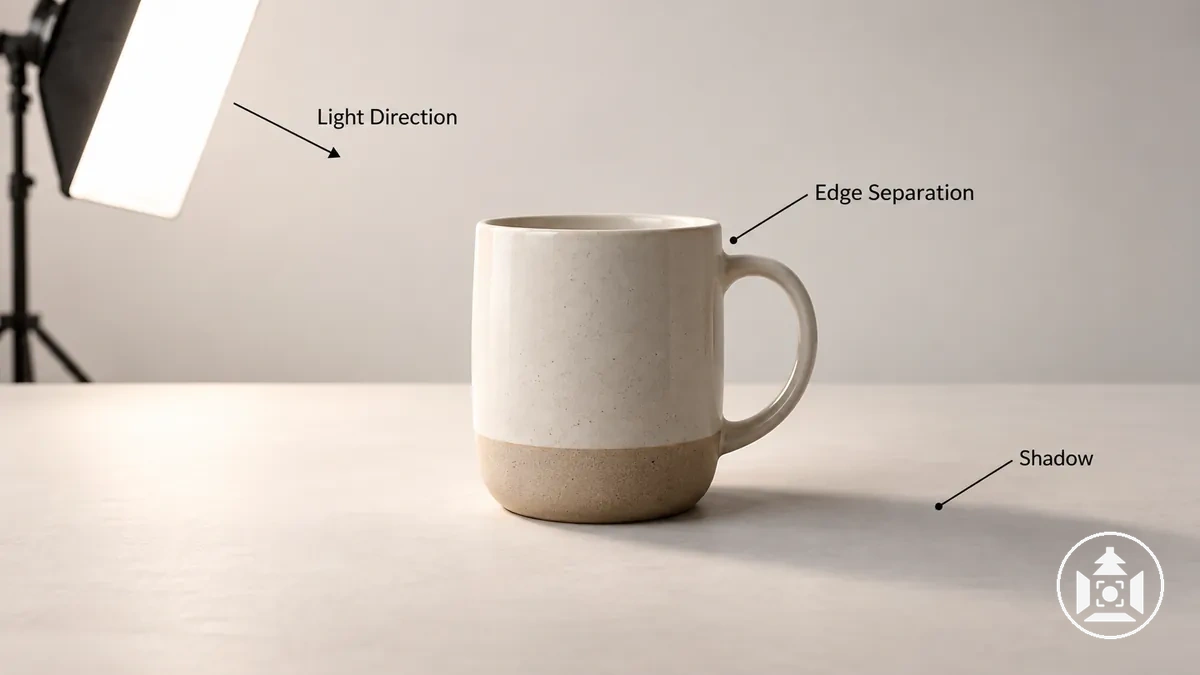
A controlled setup can make shadows and surface features more predictable than changing, uncontrolled illumination; product photography lighting choices should still reflect the product's surface and image purpose.
Background tone, separation and cleanliness affect edge definition and visual distraction around the product.
Sufficient contrast between the product and background can increase edge visibility, while distracting marks or competing background detail can make the product less visually distinct.
Choosing backgrounds for product photography therefore requires considering product colour, surface characteristics, image purpose and listing requirements rather than treating one backdrop as universally suitable.
Camera Stability, Focus and Exposure Control
Camera stability, focus placement, depth of field and exposure control influence how much product detail is recorded with usable sharpness and repeatability.
Camera movement can reduce sharpness, focus determines which product area is rendered most clearly, and exposure determines how light or dark the recorded detail appears.
Capture stability limits movement of the camera during exposure, while shutter speed interacts with camera movement and any subject motion to influence sharpness.
Focus placement determines where sharp detail is centred. A smaller aperture (higher f-number) generally increases depth of field, so more of a three-dimensional product can appear acceptably sharp from front to back; at very small apertures, diffraction can reduce fine-detail sharpness.
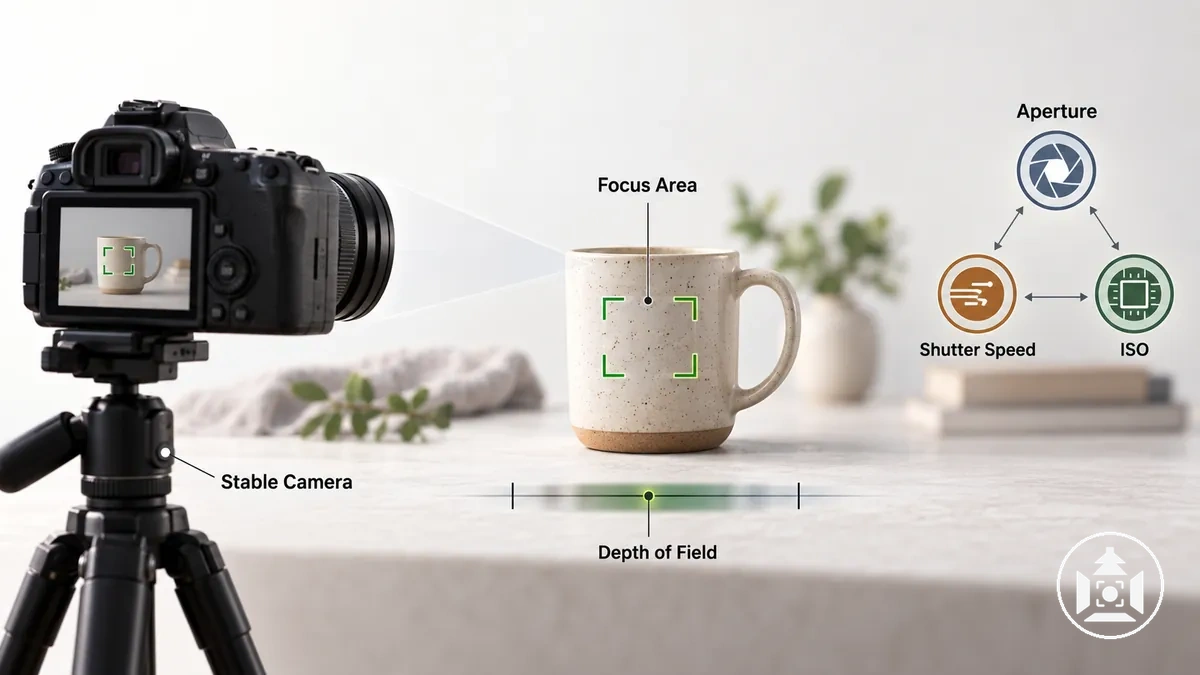
Exposure depends on the combined effect of aperture, shutter speed and ISO under the available light, so changing one control can require adjustment of another to maintain the intended image brightness.
Increasing ISO can increase recorded brightness for a given aperture and shutter speed but can also increase visible image noise, which may obscure fine product detail.
Appropriate camera settings for product photos therefore depend on the subject, available light, capture stability and desired depth of field rather than a universal settings recipe.
Framing, Angles and Product Presentation
Framing and viewing angle determine which product features are visible and how clearly the image communicates the product's form and scale.
Product placement within the frame also changes the relationship between the subject, its surrounding negative space and the details receiving visual emphasis.
Crop margin controls how tightly the frame surrounds the product, while camera height and viewpoint change which surfaces and features are visible.
Consistent alignment can make orientation easier to compare across related images, while deliberate product placement can retain useful negative space without obscuring important details.
Different viewpoints therefore serve different informational purposes rather than providing one universally suitable angle.

A front view can emphasise overall shape and identifying features, while a side view can reveal depth and profile that are less visible from the front.
A detail view can isolate a smaller product feature for closer inspection, while a wider context view can provide additional scale cues when the surrounding reference is meaningful.
The suitable framing, camera height and viewing angle depend on the product's form and the specific information the image needs to reveal.
How an Ecommerce Product Photography Workflow Fits Together
An ecommerce product photography workflow moves in a controlled sequence from planning and preparation through setup and capture to editing, review and delivery-ready files.
Each stage provides inputs or conditions for the next, with verification after capture checking whether the resulting images meet the intended requirements.
Following the sequence can reduce avoidable rework and support repeatability because requirements are established before the product and capture conditions are prepared, and review criteria can be applied to images produced under those conditions.
The workflow can be organized into the following stages, with each stage defining a purpose, dependency and check before the process moves forward.
- Plan: Define the required product information, intended images and presentation requirements. Check that the planned coverage identifies what the finished image set needs to communicate before preparation begins.
- Prepare: Ready the product and capture area according to the plan. Check product condition, placement needs and relevant requirements before establishing the setup.
- Set up: Arrange the lighting, background, camera position and other capture conditions needed for consistent production. Check that the setup makes the required product features visible before capture starts.
- Capture: Produce the planned images while maintaining the established setup and presentation choices. Check focus, exposure, framing and visible product details during capture so obvious problems can be corrected before the setup changes.
- Edit and review: Process the captured images and assess them against the planned requirements. Check visual consistency, relevant product detail and whether any issue requires a new capture rather than relying on editing to compensate for missing or poorly recorded information.
- Prepare delivery-ready files: Export the reviewed images in the required final form for their intended use. Verify that the approved images and exported files correspond to the required output before delivery.
Review and verification complete the production sequence by checking the captured and prepared output against the original requirements.
They support quality control after capture, but they do not substitute for controlling product preparation, setup and capture conditions while the photographs are being made.
Plan the Image Set and Prepare Products Before Shooting
Image-set planning begins by identifying the product information the photographs need to communicate and preparing the product before shooting.
The shot plan should establish the required views and important product features to show while accounting for variants and other listing-specific coverage needs.
Pre-shoot preparation also requires checking product condition, cleaning visible surfaces where needed, and identifying constraints that could affect the planned coverage.
Props or contextual elements belong in the plan only when they serve the intended image purpose, while a repeatable naming or shot sequence can help keep related products and variants organised.
The checklist below verifies these information needs, readiness conditions and constraints before capture begins.
- Identify required views: Check which viewpoints are needed to communicate the product's relevant form and visible information.
- Identify product features: Check that the image plan accounts for features or details that need to remain visible for the intended listing purpose.
- Account for variants: Check which colours, sizes, configurations or other relevant variants require separate coverage rather than assuming every product needs the same image set.
- Prepare product condition: Inspect the product and complete necessary cleaning or surface preparation so unintended dust, marks or presentation issues are identified before shooting.
- Confirm contextual constraints: Identify surfaces, props or contextual elements only when they are relevant to the product and intended image purpose, and note any constraints they introduce to the shot plan.
- Sequence the planned shots: Arrange the required views and variants in a repeatable shot sequence and use a consistent naming approach so planned coverage can be checked during production.
Planning is sufficient when the required product information, preparation state, relevant constraints and shot sequence are clear enough to guide capture and verify coverage.
The appropriate number of images remains conditional on the product, its important features, its variants and the information the listing needs to communicate.
Set Up and Capture Repeatable Product Images
Repeatable product-image capture requires stable product placement, background, lighting, camera support and camera position across the planned image set.
The appropriate environment and equipment can vary with the product and shooting conditions, but keeping the chosen capture conditions controlled makes frame-to-frame differences easier to identify and manage.
Build the product photography setup before systematic shooting, then use a test frame to verify how the product is recorded under those conditions.
The sequence below moves from placement and stabilization to testing, checking and capture without requiring one universal configuration.
- Place the product and background: Position the product for the planned view and establish the background around it. Check product alignment and the intended framing before continuing.
- Position the lighting: Establish lighting suitable for the product and intended view, then check the frame for unwanted reflections or other visible distractions that need adjustment before capture.
- Stabilize and position the camera: Use suitable camera support where needed and establish a camera position that preserves the intended viewpoint and framing. Check alignment before changing other capture variables.
- Capture a test frame: Record a test frame under the established conditions before proceeding through the planned views. Use it to inspect framing, product placement and the visible effect of the capture conditions.
- Check focus and exposure: Perform a focus check on the product detail that needs to appear sharp and an exposure check for important visible detail. Check for highlight or shadow clipping that would remove required product information.
- Capture the planned views: Shoot the image plan systematically while keeping the controlled setup stable where consistency is required. Before moving to the next view or product, verify alignment, focus, clipping and unwanted reflections so identified problems can be corrected while the relevant setup remains available.
Repeatability comes from maintaining the selected capture conditions where the image set requires consistency and verifying each frame before those conditions change.
The exact setup can differ by product and environment, so verification supports repeatable execution without implying that a studio, particular camera or fixed settings are required.
Edit, Review and Prepare Images for Ecommerce Use
Ecommerce product photo editing should correct presentation issues and prepare images for use while preserving an accurate representation of the product.
Corrective editing can address observable issues such as inconsistent framing, colour or tonal imbalance, and unwanted background distractions, but it should not change product characteristics that shoppers rely on for evaluation.
After selecting the usable captures, editing ecommerce product photos can proceed from crop and alignment through necessary colour correction, tonal correction and background cleanup before consistency review and export.
Not every image requires every correction; each adjustment should respond to an observable need and be checked against the physical product or a reliable capture reference when available.
The sequence separates corrective editing from final file preparation.
- Select the usable images: Review the captured frames and retain images that contain the required product information with usable focus, exposure and framing rather than expecting editing to recover information that was not captured.
- Crop and align: Adjust the crop or alignment when the product position or surrounding space is inconsistent with the intended image set. Verify that the correction preserves relevant product edges and proportions.
- Correct colour and tone when needed: Apply colour correction or tonal correction when the recorded appearance needs restrained adjustment for visual fidelity or consistent presentation. Compare the edited result with the product reference available from the capture process rather than altering colour, contrast or brightness simply for stronger visual effect.
- Clean the background: Remove unintended background distractions or edge artefacts when they interfere with a clean presentation. Verify that background cleanup does not remove, reshape or conceal genuine product features.
- Review consistency: Compare related images for consistent crop, alignment, colour appearance and overall presentation. Correct only differences that are editing issues rather than legitimate differences between products or variants.
- Prepare and export: Export the reviewed image in the form required for its intended ecommerce use, keeping the approved product appearance intact. File-format, dimension and compression requirements should follow the destination's applicable specifications rather than one universal export setting.
Corrective editing improves presentation when it resolves an observed image issue without changing what the product is represented to be.
If an edit changes a genuine colour, shape, surface detail or other decision-relevant characteristic, it crosses from correction into appearance-changing alteration and should not be treated as an accuracy-preserving fix.
How Ecommerce Product Photography Changes by Image Purpose and Product Type
Ecommerce product photography does not use one universal shooting approach because image purpose and product characteristics change both the information an image needs to communicate and the controls needed to show it.
Shot coverage, lighting, background, angle, focus and context may therefore change according to the communication purpose and the physical properties of the product.
Image purpose determines what visual information receives priority.
An image intended to identify the overall product may require coverage that makes its form and major features easy to inspect, while an image intended to communicate a specific detail may require a closer angle and more selective focus on that feature.
When context is necessary to explain use, fit or relative scale, the capture approach may include relevant surroundings; when isolated product evaluation is the purpose, a simpler background may keep attention on the product itself.
The shooting approach therefore changes according to what the image must communicate rather than following one fixed set of views.
Product characteristics determine what the subject physically requires to make that information visible.
Surface properties can affect the lighting needed to control reflections and reveal texture, while product size and shape can affect background coverage, camera position and suitable angles; small or fine features may require closer framing and more deliberate focus.
A reflective surface, for example, may require greater control of visible reflections than a matte surface, while an unusually shaped product may require a different angle to reveal important form or depth.
The appropriate method therefore depends on both the required visual information and the product's physical characteristics, with those two condition classes guiding shot coverage and capture choices.
Image Purpose and Required Shot Coverage
Shot coverage should follow the visual information each image must provide for product evaluation rather than a universal image count.
A primary view should support product identification and communicate the overall form, while additional required views depend on product features or information that the primary view cannot reveal clearly.
The image set can be planned by separating essential identification and feature coverage from context-dependent information.
The following criteria map each image purpose to the information that needs to be visible and the resulting coverage implication.
- Primary view: Requires a view that makes the product identifiable and shows its overall form clearly enough to establish what the item is.
- Alternate views: May be needed when another side, surface or orientation reveals product features that remain hidden or unclear in the primary view.
- Detail view: Helps reveal small features, texture, construction or other decision-relevant details when they cannot be evaluated adequately at the broader product scale.
- Scale and context: May require contextual visual coverage when dimensions or proportions are difficult to interpret from an isolated product image and a meaningful reference helps communicate relative scale or use.
- Packaging and included items: May need separate coverage when packaging, accessories, components or other included items are relevant to understanding what the listing contains.
- Variants: Require distinguishable visual coverage when differences such as colour, configuration or visible design features materially change what shoppers need to identify between variants.
A visually simple product with few hidden features may need less shot coverage than a product with multiple components, ambiguous scale, significant texture or features visible only from particular viewpoints.
These coverage decisions describe what information needs a view rather than prescribing a fixed taxonomy of types of ecommerce product photography or a universal number of images.
The image set is sufficiently planned when its required views address the product questions that would otherwise remain visually unresolved.
Product Characteristics That Change the Shooting Approach
Product characteristics can change capture priorities because reflectivity, transparency, texture, colour, size, shape, fine detail and dimensional complexity affect what must remain visible and which shooting controls may need adjustment.
The relevant response follows the observable product condition rather than treating every product in a broad category as requiring the same setup.
A visible reflection may change lighting or angle decisions, while poorly separated transparent edges may change the background or lighting arrangement.
Fine texture or small product features can increase the importance of light quality and focus placement, while size and shape can affect support, camera position and framing.
The table maps each physical characteristic to its observable condition, the shooting variable affected and the practical implication for capture.
| Product characteristic | Observable condition | Shooting variable affected | Practical implication |
|---|---|---|---|
| Reflectivity | Lights, surroundings or the camera appear as visible reflections on the surface. | Lighting and angle | Light placement, apparent light-source size or camera-to-product angle may need adjustment to control distracting reflections while retaining useful surface definition. |
| Transparency | Edges or internal forms have weak separation from the background. | Lighting and background | Background tone, separation and light placement may need adjustment so transparent boundaries and relevant internal detail remain distinguishable. |
| Texture | Surface relief or material detail appears flattened or insufficiently defined. | Lighting and focus | Light direction or softness and focus placement may need adjustment to reveal relevant texture without assuming one universal setup. |
| Colour | Product colour appears difficult to distinguish from the background or changes noticeably under the selected illumination. | Lighting and background | Illumination and background choice may need adjustment to preserve useful colour separation and a faithful visible representation. |
| Size | The product exceeds the practical coverage of the current background, support or framing arrangement, or is small enough that fine features occupy little of the frame. | Background, support, camera position and framing | The capture area, support and camera position may need to change to accommodate the product while keeping required features visible at an appropriate image scale. |
| Shape | Important surfaces, depth or contours remain hidden from the current viewpoint. | Angle, support and framing | Product orientation, support or camera angle may need adjustment so the required form is visible without distorting the product's apparent shape. |
| Fine detail | Small features are not rendered with enough visible separation or sharpness for their intended informational purpose. | Focus, framing and lighting | Closer framing, deliberate focus placement or lighting adjustment may be needed to make the relevant detail distinguishable. |
| Dimensional complexity | Overlapping parts, recesses or multiple planes make important features difficult to see from one position. | Angle, lighting, focus and support | Viewpoint, illumination, focus placement or product support may need adjustment according to which surfaces and features the image is intended to reveal. |
How to Evaluate Ecommerce Product Image Quality Before Publishing
Publication readiness requires ecommerce product images to pass a combined review of product accuracy, visible detail, consistency, technical file condition and shot coverage.
An image is not ready merely because one dimension is acceptable; the image set should represent the product faithfully, show the required information clearly and meet the applicable listing requirements.
The quality review should move from visual fidelity to set consistency, technical readiness and coverage because each dimension answers a different readiness question.
Strong sharpness cannot compensate for inaccurate product representation, consistent framing cannot compensate for missing product features, and a technically acceptable file cannot compensate for insufficient visual coverage.
The following verification sequence keeps each check tied to an observable condition and a publication decision.
- Verify product accuracy and visible detail: Check whether the images show the product's decision-relevant colour, shape, surface characteristics and features without misleading alteration, and whether required detail is visibly clear. If important information is inaccurate, obscured or insufficiently sharp for inspection, the affected image requires correction or recapture before publication.
- Verify consistency across the image set: Compare related images for unintended differences in framing, alignment, lighting, colour appearance and presentation. Differences caused by the product, variant or intended view can remain, while unexplained presentation differences should be corrected when they interfere with a coherent representation.
- Verify technical file condition: Check that each final file meets the destination's applicable requirements for dimensions, file format, file size or compression where those requirements are specified. Visible compression damage, unintended cropping or a file that does not meet the relevant listing requirements indicates that file preparation needs correction before publishing.
- Verify shot coverage: Check whether the complete image set lets the shopper inspect the product features and views required for the listing's informational purpose. If a relevant feature, included item, variant distinction, scale cue or other necessary product information remains visually unresolved, additional or replacement coverage may be required.
- Make the publication decision: Treat the image set as ready only when the applicable accuracy, detail, consistency, technical and coverage checks are satisfied together. When a check fails, trace the defect to that quality dimension and correct or recapture the affected material rather than allowing a passing result elsewhere to override it.
This readiness check identifies whether an image set can proceed to publication; it does not require turning every defect into a troubleshooting workflow.
Recurring capture or presentation problems can instead be examined as common product photography mistakes after the evaluation point is complete.
Product Accuracy, Sharpness and Colour Fidelity
Product image fidelity depends on whether the image represents the product's shape, proportions, texture and important detail accurately, preserves sufficient sharpness where inspection is expected, and maintains credible colour.
Greater sharpness, saturation or contrast does not automatically mean greater accuracy if those changes alter how the product actually appears.
Geometry and detail should be checked first: shape and proportions should remain faithful to the product, visible texture should not be obscured or exaggerated, and focus should fall where important detail needs to be inspected.
Exposure should preserve relevant highlight, midtone and shadow information without allowing important product features to disappear.
The following criteria separate these checks because fidelity, sharpness and colour can fail for different reasons.
- Shape and proportions: Check whether perspective, crop or editing makes the product appear stretched, compressed or otherwise different from its actual form. A visible distortion indicates that the image does not accurately represent product geometry.
- Texture and detail: Check whether surface texture, edges, markings and other decision-relevant details remain visible without artificial enhancement that changes their apparent character. Missing or exaggerated detail reduces visual fidelity.
- Focus and sharpness: Check whether the product areas that require inspection appear sufficiently sharp for their intended purpose. Excessive sharpening that creates halos or false edge detail should not be treated as an improvement in accuracy.
- Exposure: Check whether brightness preserves relevant product information across visible light and dark areas. If important details disappear because highlights are clipped or shadows are excessively blocked, the image requires correction or recapture.
- Colour fidelity: Check whether colour appears credible relative to the product under the intended viewing workflow, including appropriate white balance and restrained correction. Perceived colour can vary with capture lighting, white balance, display calibration and viewing conditions, so exact colour consistency across every screen cannot be assumed.
An accurate correction restores a more faithful representation, such as adjusting white balance when the recorded colour is visibly shifted by the capture conditions.
An appearance-changing edit goes beyond correction when it makes the product materially more saturated, alters its shape or changes surface detail in a way that no longer represents the product faithfully.
Consistency Across the Product Image Set
Consistency across a product image set means keeping comparable visual variables intentionally stable so shoppers can compare views or related products without avoidable presentation shifts.
Lighting, exposure, white balance, background treatment, camera height, angle, crop, scale, alignment, shadow treatment and editing style should remain consistent where those variables are intended to be comparable.
Visual consistency does not require every image to be identical.
A different angle, scale or background can vary intentionally when a particular view or contextual image has a distinct informational purpose; the quality check is whether each difference is purposeful rather than an unintended shift.
The checklist verifies recurring variables against that distinction.
- Lighting, exposure and white balance: Check whether comparable images maintain a consistent lighting character, brightness relationship and colour treatment. An unexplained shift indicates an image-set inconsistency, while a deliberate lighting change can remain when the image purpose requires it.
- Background treatment: Check whether background colour, tone and treatment match across images intended to use the same presentation. A difference is acceptable when a contextual or otherwise distinct image intentionally uses another background.
- Camera height and angle: Check whether comparable views use the intended camera height and angle consistently. A changed viewpoint should correspond to a purposeful alternate view rather than accidental camera-position variation.
- Crop and scale: Check whether the product occupies a consistent proportion of the frame where comparable presentation is intended. A tighter crop or different scale can vary intentionally when the image is designed to show detail or context.
- Product alignment and position: Check whether comparable images keep the product aligned and positioned according to the set's established presentation. Unintended shifts can make related images appear misaligned even when the products themselves are correctly represented.
- Shadow treatment: Check whether comparable images show shadows with a consistent visual treatment where the same presentation is intended. Differences should correspond to a purposeful change in image type or subject condition rather than an unexplained set-level shift.
- Editing style: Check whether comparable images match in restrained colour, tonal and presentation treatment. An isolated change in contrast, saturation or other editing treatment indicates inconsistency when no intentional product or image-purpose difference explains it.
Resolution, File Quality and Ecommerce Listing Readiness
An ecommerce delivery image is technically ready when its dimensions and usable resolution preserve the detail needed for its intended display, compression does not introduce distracting artifacts, the file remains intact, colour handling is appropriate, and the file meets the destination's listing requirements.
Exact pixel dimensions, file-size limits and accepted formats are destination-specific rather than universal.
Technical readiness combines intrinsic file quality with destination compatibility.
A file can retain strong visible detail yet still be unsuitable if its dimensions, file weight, format or other technical properties conflict with the listing destination, while aggressive compression can reduce file weight at the cost of visible image quality.
The following criteria separate conditions that can be evaluated in the delivery file from requirements that need confirmation against the destination.
- Dimensions and usable resolution: Check whether the image contains enough pixel detail for the intended listing display and inspection behaviour. Insufficient dimensions or resolution can limit visible product detail, while a larger pixel count alone does not guarantee better image quality.
- Compression and artifacts: Inspect the delivered image for visible compression artifacts or loss of important product detail. If reducing file weight introduces distracting blockiness, ringing, banding or other visible degradation, the delivered file no longer preserves the intended visual quality.
- File integrity: Check that the delivery file opens and renders as intended without corruption, missing image data or unintended cropping. A file-integrity problem makes the affected image unsuitable for publication until a valid file is produced.
- Colour handling: Check whether the delivered image preserves the intended colour appearance through the applicable export and display workflow. Colour appearance can still vary with colour management and display conditions, so technical readiness should not be interpreted as guaranteeing identical colour on every screen.
- File weight: Check file weight against the destination's current limits and delivery needs rather than treating a smaller file as inherently better. Excessive compression used only to reduce file weight can sacrifice visible detail, while a file that exceeds a platform limit can fail the destination's listing requirements.
- Compatibility and listing requirements: Verify the destination's current ecommerce product image requirements for applicable dimensions, file size, accepted formats and other fixed specifications. Compatibility requires the delivered file to meet those destination-specific conditions; no single set of pixel, file-size or format rules applies to every ecommerce platform.
Fixed technical specifications should therefore be confirmed against the current destination whenever they determine acceptance or display behaviour.
The publication check is complete only when the file preserves usable image quality and satisfies the applicable listing conditions.
Clear Product Coverage for Online Shoppers
Product coverage is sufficient when the complete image set answers the decision-relevant visual questions a shopper is likely to have about the product.
The review should focus on whether overall form, alternate sides, product features, texture, detail and other necessary visual information are actually inspectable, rather than judging completeness by image count or attractiveness alone.
The core check is whether the image set reveals the product clearly enough to remove avoidable uncertainty about its form, orientation and important features.
Missing visual evidence leaves a specific shopper question unresolved, while additional imagery is only useful when it contributes information the existing views do not already provide.
The following criteria separate generally decision-relevant coverage from information that becomes necessary only for particular products.
- Overall form: Check whether the image set shows the product's overall shape and orientation clearly enough for a shopper to understand what the item looks like. If the basic form remains ambiguous, visual coverage is incomplete.
- Alternate sides: Check whether additional sides or viewpoints reveal surfaces, openings, controls or other features that are not visible from the main orientation. If a decision-relevant side remains hidden, the shopper is left with unresolved uncertainty about the product.
- Product features: Check whether important functional or identifying features are visible at a useful scale. If a feature affects product evaluation but cannot be inspected in the image set, another view may be required.
- Texture and detail: Check whether material texture, surface finish, construction details or other small visual attributes can be examined where they matter. Coverage is incomplete when relevant detail is too distant, obscured or absent.
- Scale: Check whether relative scale is understandable when the product's size is difficult to judge from isolated views. Contextual evidence may be required when proportions or dimensions would otherwise remain visually ambiguous.
- Included components and variants: Check whether included components, accessories or visually distinct variants are shown when they affect what the shopper expects to receive or identify. Separate visual evidence may be needed when these differences cannot be inferred reliably from the main product views.
- Use context: Check whether contextual imagery is needed to clarify use, fit, placement or interaction with another object. Use context is optional when it adds no decision-relevant information and should not be treated as a universal requirement.
A simple product with few hidden features may achieve complete image-set coverage with relatively little visual evidence, while a complex product may require more views because more shopper questions remain possible.
Coverage is complete when the image set communicates the product's decision-relevant visual attributes clearly and consistently, with no material uncertainty left unresolved by missing visual information.