
Ecommerce Product Photography Types and Essential Shot Types
Ecommerce product photography uses complementary classification layers: photography types describe how the product is presented, while shot types describe what an image communicates or how its subjects relate. A listing can combine these layers; choose the mix from the product information shoppers need to inspect rather than from a fixed universal shot count.
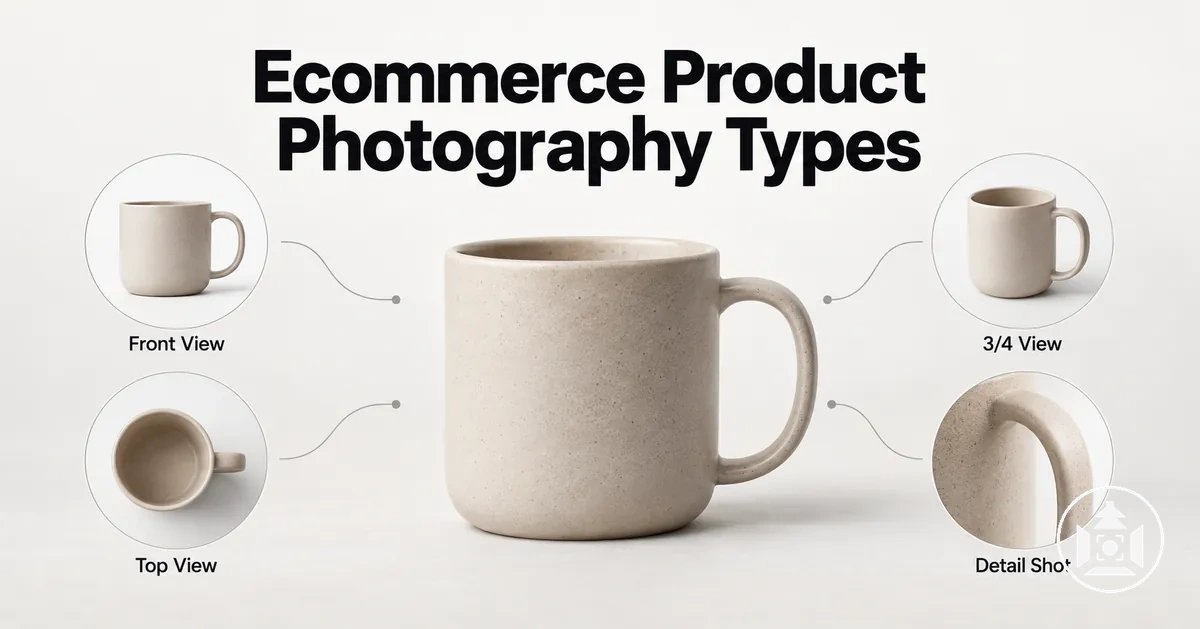
Ecommerce image classification at a glance
Plan each product image with two complementary layers: first decide the presentation approach, then decide the image's information job or subject relationship.
Presentation type — how the product is shown
- White-background: isolates the product for clear inspection and consistency.
- Lifestyle / in-use: adds realistic or styled context for use, scale, or setting.
- 360° / spin: expands viewing coverage across multiple sides through a rotational sequence.
Shot type — what the image communicates
- Individual / group: clarifies whether one item or multiple related items are primary subjects.
- Hero: establishes identity and overall appearance.
- Detail: reveals a specific feature, material, or finish.
- Scale: provides a familiar visual size reference.
- Packaging: shows relevant packaging, contents, or included components.
Keep two other dimensions separate: camera angle describes the viewpoint, while background describes the visual setting. One photograph can carry all four dimensions at once.
The useful image mix depends on the product attributes and relationships customers need to evaluate. A single photograph can therefore combine a presentation type, shot type, camera angle, and background without those labels becoming interchangeable.
Table of Contents
How Photography Types Differ from Shot Types, Angles and Backgrounds
Product image classification uses photography type, shot type, camera angle, and background to describe different aspects of the same image.
A photography type classifies the presentation approach, a shot type classifies the primary information function or subject relationship, a camera angle classifies the viewpoint, and a background classifies the visual setting.
These dimensions can describe one product image at the same time without representing the same classification.
The distinction becomes clearer when each dimension is matched to the specific aspect it classifies.
This separates how the product is presented from what the image communicates, where the camera views the product from, and what surrounds the product.
| Dimension | What It Classifies | Example | Why It Matters |
|---|---|---|---|
| Photography type | Presentation approach | Lifestyle photography or white-background photography | Identifies the broader context in which the product is presented. |
| Shot type | Information function or subject relationship | Detail shot, scale shot, or individual/group shot | Identifies the product information the image communicates or how its primary subjects relate. |
| Camera angle | Viewpoint | High angle or eye level | Identifies the position from which the product is viewed. |
| Background | Visual setting | Plain background or styled background | Identifies the setting that appears around or behind the product. |
A single product image can therefore be a lifestyle photograph, function as a detail shot, use a high-angle viewpoint, and include a styled background at the same time.
Camera angle remains a viewpoint dimension rather than a shot-function category; the execution of product photography angles and composition is a separate concern from classifying the informational purpose of the shot.
The supporting image illustrates how these classification dimensions can coexist within one product photograph.

Main Types of Ecommerce Product Photography
Ecommerce product photography types differ mainly in the context or viewing coverage they provide around a product.
White-background photography and lifestyle photography primarily change presentation context: one isolates the product for visual clarity and consistency, while the other places it in an environment or in-use context.
360-degree photography instead changes viewing coverage by presenting multiple views around the product through a rotational image approach.
These three presentation approaches are complementary because they make different kinds of product information easier to understand.
White-background photography keeps attention on the isolated product, lifestyle photography adds contextual information about the product in use, and 360-degree photography expands viewing coverage across multiple sides.
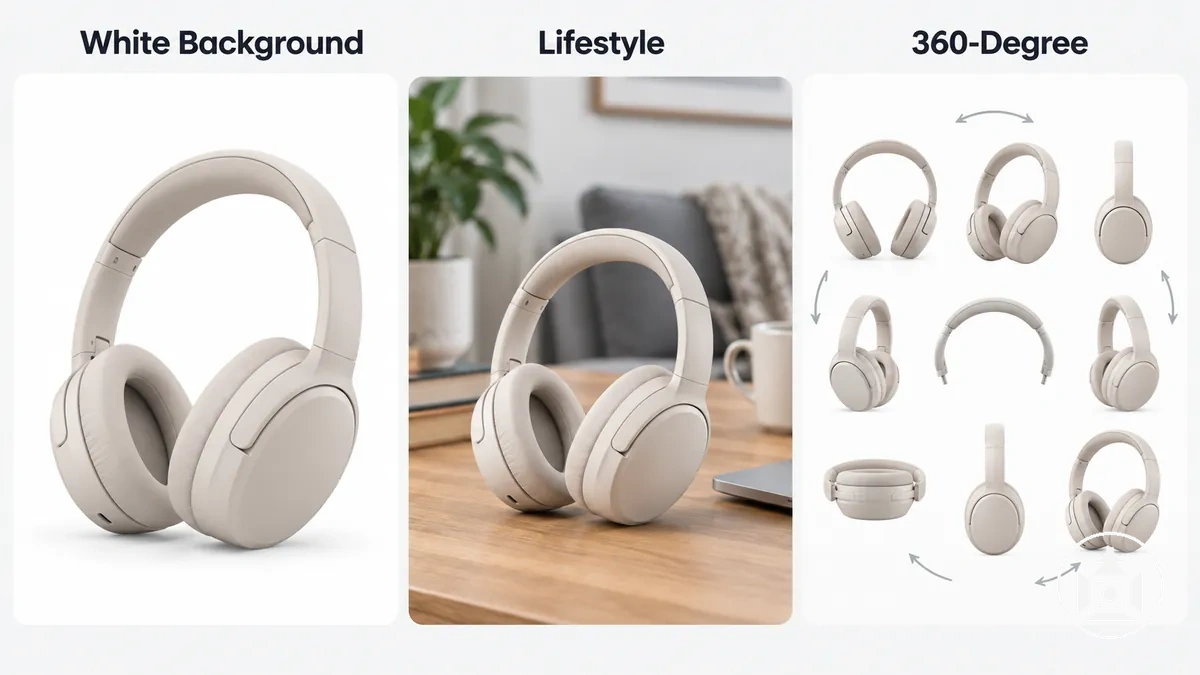
The appropriate combination depends on whether the listing needs clearer product-focused presentation, contextual understanding, broader visual inspection, or a combination of these needs, so the three types function as distinct presentation approaches rather than a ranked list.
White-Background Product Photography
White-background product photography shows an isolated product against a plain white or near-white background so the item can be inspected without surrounding visual context.
This image approach supports product clarity by keeping the product shape, colour, outline, and visible variant details easy to distinguish from the background.
A consistent background can support visual consistency across related product images. The exact background specification depends on the marketplace or brand system, so a white-background approach should not be treated as one universal technical background requirement.
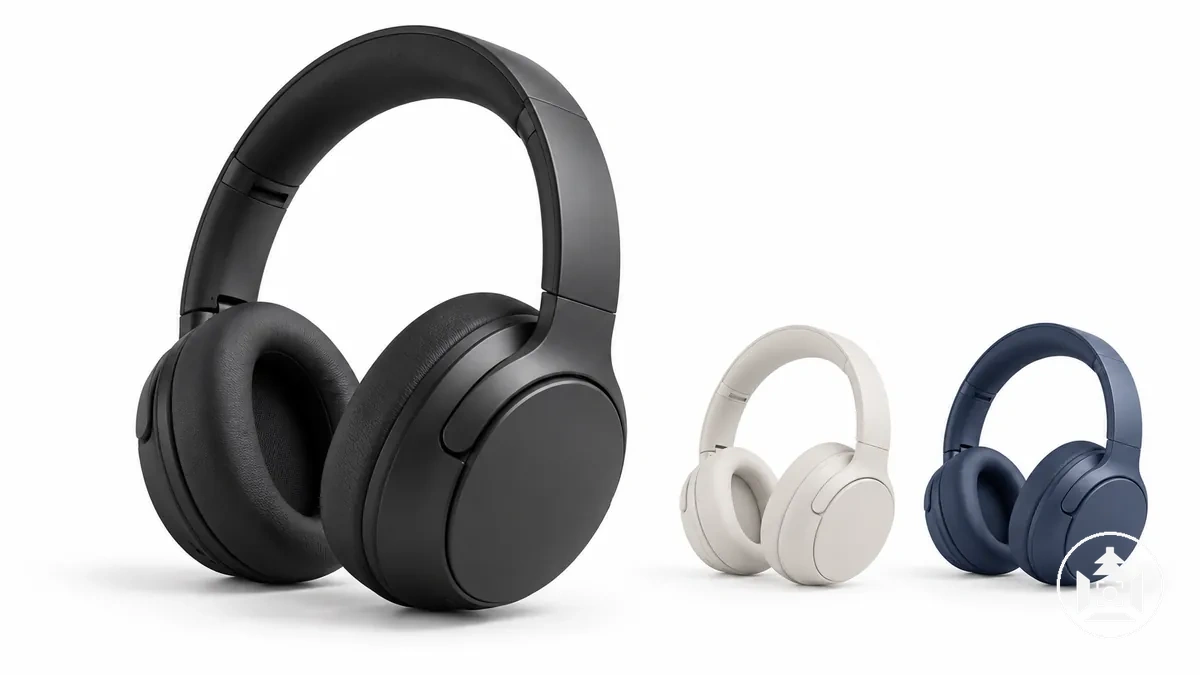
For example, a listing with several colour variants can use the same plain background so customers can compare the visible colour and product shape without changes in the surrounding environment.
A white background describes the visual setting rather than the shot function, so the image can still serve different informational purposes; white background versus lifestyle photography addresses the separate choice between product isolation and added contextual imagery.
Lifestyle and In-Use Product Photography
Lifestyle product photography places a product in a realistic or styled real-world context, such as being worn, held, or used in a relevant environment.
An in-use image keeps the product visible while the setting can suggest product use, scale, or the situation in which the item is intended to function.

The environment can add information that isolated appearance alone does not show, including how a product relates to a person, surrounding objects, or a particular setting.
For example, showing a backpack worn by a person provides a visual scale cue while also showing how it sits during use.
This contextual presentation can indicate function, scale, setting, or audience cues without making those implications universal.
Lifestyle context can also coexist with a hero shot, detail shot, scale shot, or group shot because photography type and shot function describe different aspects of the same image.
360-Degree or Spin Product Photography
360-degree photography, also called spin photography, consists of a sequence of views presented to simulate rotation around a product.
This rotational presentation increases viewing coverage by showing multiple sides of the item, which can support product inspection beyond what a single still image shows.
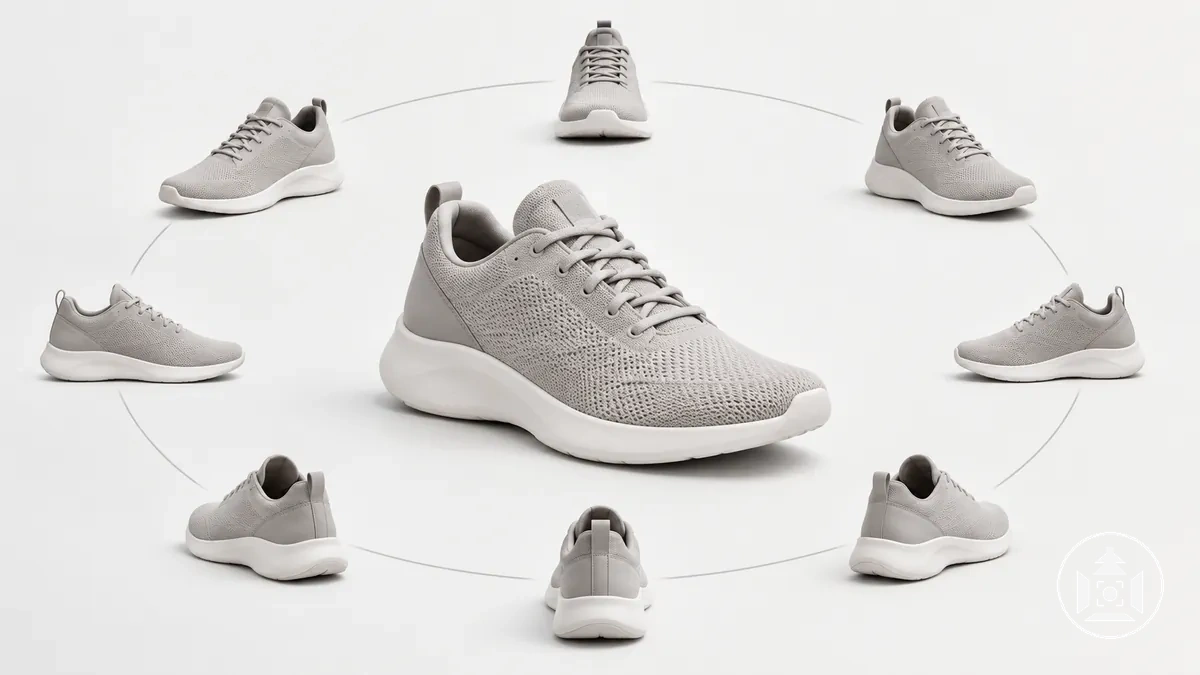
A 360 product view presents its image sequence as rotational coverage, while separate multi-angle images remain individual still views rather than one spin sequence.
For example, rotating a shoe through multiple views can help a customer inspect its front, sides, heel, and overall form, although the available interaction and platform support depend on how the listing implements the sequence.
This distinction concerns viewing coverage and presentation behaviour rather than image quality or a universal preference for one format; 360 versus standard product photography covers that broader comparison with standard still photography.
Essential Product Shot Types for Ecommerce Listings
Ecommerce product shot types classify an individual image by the information it contributes or the relationship among its primary subjects within an ecommerce listing.
A hero shot primarily establishes product identity and overall appearance; detail, scale, and packaging shots address features, size, or package contents; and individual or group shots clarify whether one item or multiple related items are presented as primary subjects.
These labels operate at the shot level rather than at the camera-angle or background level. Hero, detail, scale, and packaging labels primarily describe an information job, while individual and group labels also describe subject count or relationship.
Each shot type connects an informational job to a product attribute or relationship that a customer may need to understand.
A detail shot can clarify a feature or material, a scale shot can provide a size reference, and packaging or group shots can show contents or relationships among items.
The table organizes these functions by the customer question each image addresses; it does not prescribe a mandatory image count.
| Shot Type | Primary Information Job | Typical Product Detail or Relationship | Customer Question Addressed |
|---|---|---|---|
| Individual shot | Isolate one primary sellable item | One product, model, or visible variant | Which specific product or variant am I looking at? |
| Hero shot | Establish the product clearly | Overall identity, shape, or visible variant | What is the product and what does it look like overall? |
| Detail shot | Show a specific feature closely | Material, texture, feature, or craftsmanship | What does this particular feature or surface look like? |
| Scale shot | Provide a visual size reference | Size, proportions, or fit relative to a familiar reference | How large is the product or how does it fit? |
| Packaging shot | Clarify packaging or included contents | Package presentation, included items, or contents | What packaging or contents are shown with the product? |
| Group shot | Show multiple items together | Assortment, set contents, variants, or relationships among products | Which items belong together and how do they relate? |
A useful combination of shot types depends on the product information customers need and the complexity of the item or assortment.
Products with more features, size considerations, included components, or item relationships may need different complementary shot functions, so there is no fixed universal shot count for every ecommerce listing.
Individual Product Shots
An individual product shot features a single product or sellable item as the clear primary subject.
The defining attribute is subject count: one product or sellable item is the primary subject, so its identity and basic appearance can be understood without another product competing as a co-primary subject.
Isolating one product can make its shape, colour, variant, and other visible identity details easier to distinguish; for example, a single-product image of one shoe colour can show that variant without other colour variants sharing the frame.
Individual describes how many products are featured, not the background, angle, or shot function, so an individual product shot can also be a hero shot or detail shot and can use different backgrounds or viewing angles.
Hero Shots
A hero shot is a prominent product image designed to present the product with strong immediate clarity or visual impact.
Its functional role is to establish product focus and shape the viewer's first impression, often by emphasizing the overall presentation or a key feature.
Styling, props, background, and context can vary as long as the product remains the dominant subject.
For example, a watch hero shot might place the watch in a styled setting while keeping its face and overall form visually prominent, whereas a neutral catalogue image may present the same product without that contextual styling.
A hero shot is therefore defined by its prominent first-impression function rather than a fixed visual style, and it is not automatically the same as a marketplace primary image.
Detail and Close-Up Shots
A detail shot or close-up isolates a small product feature or material so its visible characteristics are easier to inspect.
Depending on the product, the image can reveal texture, construction, controls, finish, or craftsmanship that may not be clear in a wider product view.
Useful close-ups focus on details that answer a specific product question or clarify customer expectations.
The relevant target depends on the product category: stitching or surface texture can clarify material and construction, while controls, ports, closures, or labels can clarify operation, fastening, or product identity.
A close-up adds information when the visible detail improves understanding of the product; magnification used only for decoration does not serve the same informational function.
Scale Shots
A scale shot is a product image that includes a familiar size reference so viewers can judge the product's relative size, dimensions, or proportions more intuitively.
The reference may be a familiar object, person, or environment, but the image suggests relative product scale rather than providing exact dimensions from appearance alone.
A useful size reference should be familiar to the intended viewer, visibly comparable with the product, and presented with proportionally truthful perspective.
For example, showing a backpack worn by a person can help communicate its proportions and suggest fit because the person provides a recognisable reference for relative size.
Ambiguous references or distorted perspective can create a misleading scale impression, so a scale image does not replace stated product dimensions.
Unlike generic lifestyle styling, the surrounding person or object in a scale shot has an informational role: it helps communicate size rather than merely adding atmosphere.
Packaging Shots
A packaging shot is an ecommerce image that deliberately shows product packaging when the box, container, wrapping, label, or packaged set is relevant to what the customer receives or needs to recognise.
It can clarify how the product is identified or presented and, where applicable, which contents or included components belong to the packaged product.
Relevant packaging details can include a label that identifies a variant, visible contents that clarify included items, a bundle configuration that shows how components are packaged together, or presentation and storage features that affect received-item expectations.
These attributes are useful when they communicate product information rather than merely making the packaging more visually prominent.
A packaging shot for an ecommerce listing documents packaging as part of the product representation; imagery created for packaging print serves a different purpose and belongs to packaging artwork or production rather than this shot type.
Group and Collection Shots
A group shot or collection shot presents multiple products, variants, components, or related items together so their product relationship is clear.
The grouping can show that the items form a bundle, set, variant family, or collection, helping viewers understand the assortment, included components, comparative size, or coherence among the products.
The relationship should explain why the items appear together rather than merely placing several products in one frame.
For example, a grouped product image showing the colour variants of the same bottle can communicate that the products belong to one range, while a set image can clarify which included components belong together.
After the required shot relationships are identified, planning the product photography setup can address how those selected shots will be produced.