
Smartphone vs Camera for Ecommerce Product Photography
For ecommerce product photography, a capable smartphone can produce ecommerce-ready images when light is controlled, cropping is modest, the built-in optics suit the product, and its controls are repeatable enough for the job. Choose a suitable dedicated camera when you need more usable detail or crop headroom than the phone can deliver, fixed exposure or focus behaviour, broader lens options, or a highly standardised catalogue workflow; lighting, stability, and technique still affect both.
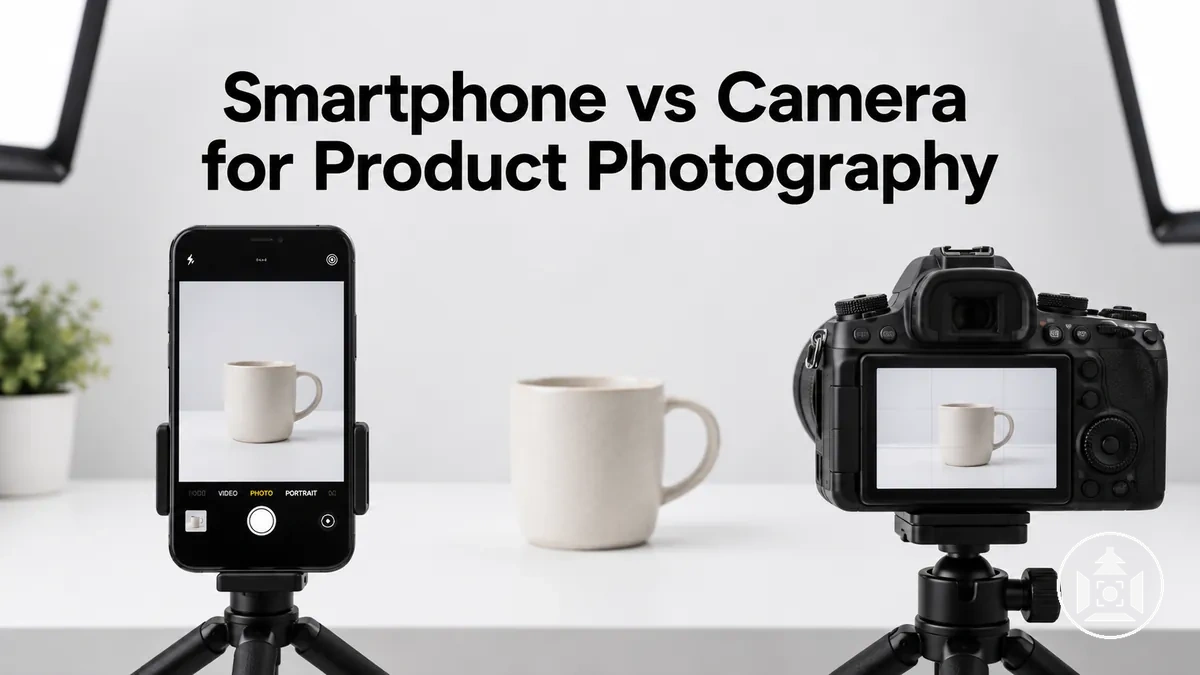
Choose by the shooting requirement
Use the requirement that is hardest to satisfy as the deciding factor. Neither device wins by category alone.
| Requirement | Smartphone tends to fit when | Dedicated camera becomes more useful when |
|---|---|---|
| Detail and cropping | The final image needs modest detail and little cropping or digital enlargement. | Fine detail must survive heavier cropping or the phone does not provide enough usable crop headroom. |
| Lighting | Light is sufficient, controlled and repeatable. | Light is more demanding and additional capture headroom or direct exposure control materially helps. |
| Exposure and focus | Automation, focus or exposure locks, or available manual controls are consistent enough for the job. | Exposure or focus decisions must remain deliberately fixed across products or changing conditions. |
| Optics and framing | Built-in focal lengths provide suitable framing from the camera position the product requires. | Broader lens choice, working-distance options or tighter depth-of-field control are needed. |
| Repeatability and volume | Production volume and catalogue consistency demands are modest. | Many products require standardised framing, capture behaviour and optical choices across a series. |
Decision rule: choose the least complex device that can reliably meet the required detail, framing, control and repeatability. If both can meet those requirements, the simpler workflow is usually the practical choice.
Compare the devices in this order: usable image quality and crop tolerance, then exposure, focus and optical control, then setup effort and repeatability across the catalogue.
Table of Contents
Image Quality Differences Between Smartphones and Cameras
Under comparable conditions, both a smartphone and a dedicated camera can produce a clear product image, but the practical image quality gap changes with lighting and how heavily the file must be cropped or processed.
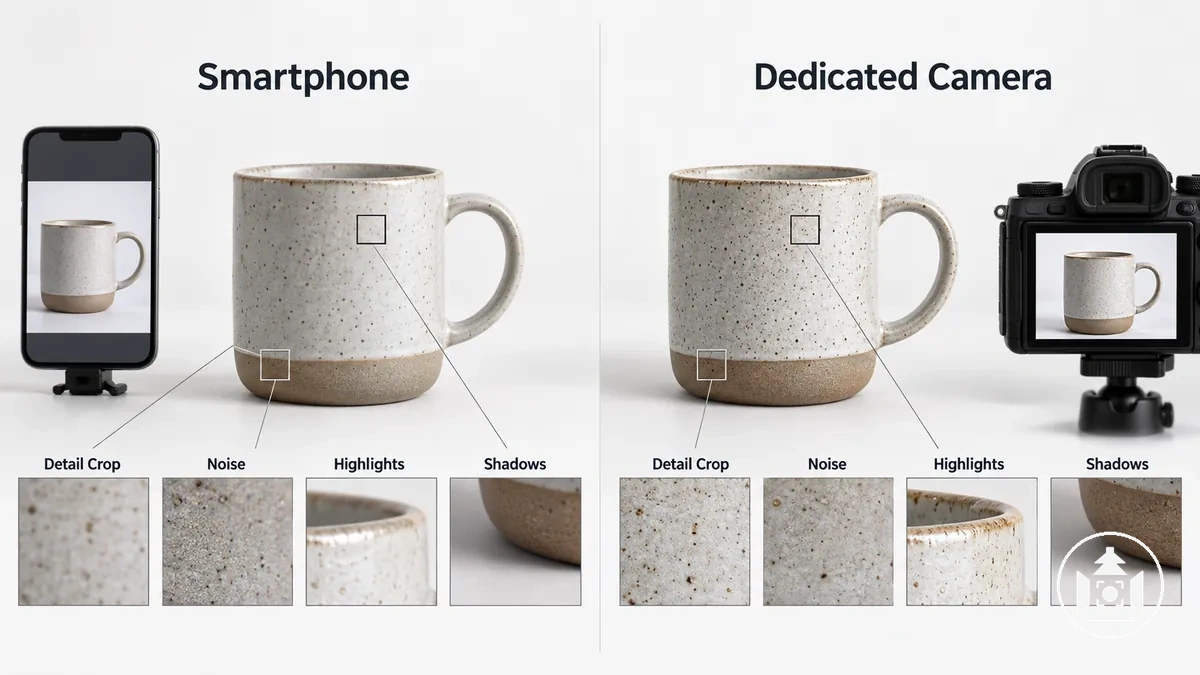
The useful comparison is therefore not megapixel count alone, but how each device retains detail, tolerates cropping, controls noise, preserves highlights and shadows, and processes the captured image.
These criteria affect how much usable information remains in the final product image.
A controlled, well-lit capture that needs little cropping can narrow visible differences because both device classes are operating under favourable conditions; lower light or crop-heavy shooting increases the demands on detail retention, cropping tolerance, noise, dynamic range, and processing, so differences can become more apparent.
| Image-quality attribute | Smartphone | Dedicated camera | Practical implication for product images |
|---|---|---|---|
| Detail retention | Usable detail is influenced by the phone's optics, focus, exposure, lighting, and computational processing. | Usable detail is influenced by the camera's sensor, lens, focus, exposure, lighting, and processing. | More retained detail keeps fine textures, edges, labels, and surface features clearer at the intended output size. |
| Cropping tolerance | Heavy cropping or digital zoom uses a smaller portion of the captured image, making lost detail and processing artefacts more visible when present. | Cropping tolerance depends on the usable detail in the original capture rather than megapixel count by itself. | Greater usable detail allows tighter reframing before important product features visibly deteriorate. |
| Noise | Computational processing can reduce visible noise, with the result conditioned by the smartphone, capture mode, exposure, and lighting. | Visible noise is conditioned by sensor capability, exposure, lighting, and processing. | More visible noise or stronger noise reduction can reduce the clarity of fine texture and edge detail. |
| Dynamic range | Computational processing can influence how highlights and shadows are rendered, with behaviour conditioned by the smartphone and capture mode. | Highlight and shadow retention is conditioned by capture capability, exposure, and processing. | Retaining more usable tonal information preserves visible detail across bright and dark areas of the product. |
| Processing behaviour | Automated computational processing can influence sharpening, noise reduction, tone mapping, and the appearance of fine detail. | Processing behaviour is influenced by the selected capture format, in-camera processing, and subsequent workflow. | Processing can change fine texture, edges, highlights, and shadows, affecting how faithfully product characteristics remain visible. |
The image-quality difference can therefore be relatively small for a well-lit product that requires little cropping, yet become more consequential when available light is limited or substantial cropping is required.
The underlying effects of resolution and cropping, and of sensor behaviour, noise, dynamic range, and computational processing, require separate examination rather than being reduced to a single device-class verdict.
A side-by-side detail crop from the same product photographed under comparable conditions can visually show where differences in usable detail and processing become apparent without duplicating the criteria organised in the table.
Resolution, Detail, Cropping, and Digital Zoom
Resolution describes the dimensions of a native capture, but nominal resolution does not by itself determine how much usable detail a product image contains.
Usable detail is the product information actually resolved by the complete capture, including fine edges, texture, and small features that remain distinguishable at the intended viewing size.
Cropping uses a smaller area of the native capture, so progressively tighter cropping leaves less captured information available for the final image and reduces crop headroom. As a geometric example, cropping both width and height to 50% retains 25% of the original pixel area; whether that remaining area still contains enough resolved product detail depends on the original capture and output size.
Digital zoom commonly creates a tighter view by using only part of the captured image and may enlarge that result, but enlargement does not restore detail that was not captured.
Physical reframing by moving closer, or optical framing where available, can make the product occupy more of the native capture before post-capture cropping, provided the new camera position preserves the required composition, focus distance and perspective.
The following attributes separate capture resolution from the reframing choices that determine how much usable detail remains:
- Native resolution: the starting image dimensions establish how much captured image data is available before cropping, but they do not guarantee resolved product detail.
- Resolved detail: usable detail is the distinguishable product information retained in the image, so two captures with similar nominal resolution can differ in the detail they actually resolve.
- Crop headroom: a product that occupies more of the native capture can generally be reframed more tightly before important product detail is discarded; a smaller subject leaves less crop flexibility for the same output size.
- Digital zoom: a digitally enlarged view uses a smaller portion of the captured scene rather than adding newly captured detail, so stronger digital enlargement can make limited detail more apparent.
The image below isolates the resolution-detail relationship by showing the same product at native framing, a marked crop area, and the resulting crop or digital-zoom view, making the reduction in captured area visible without relying on a device-specific pixel count.
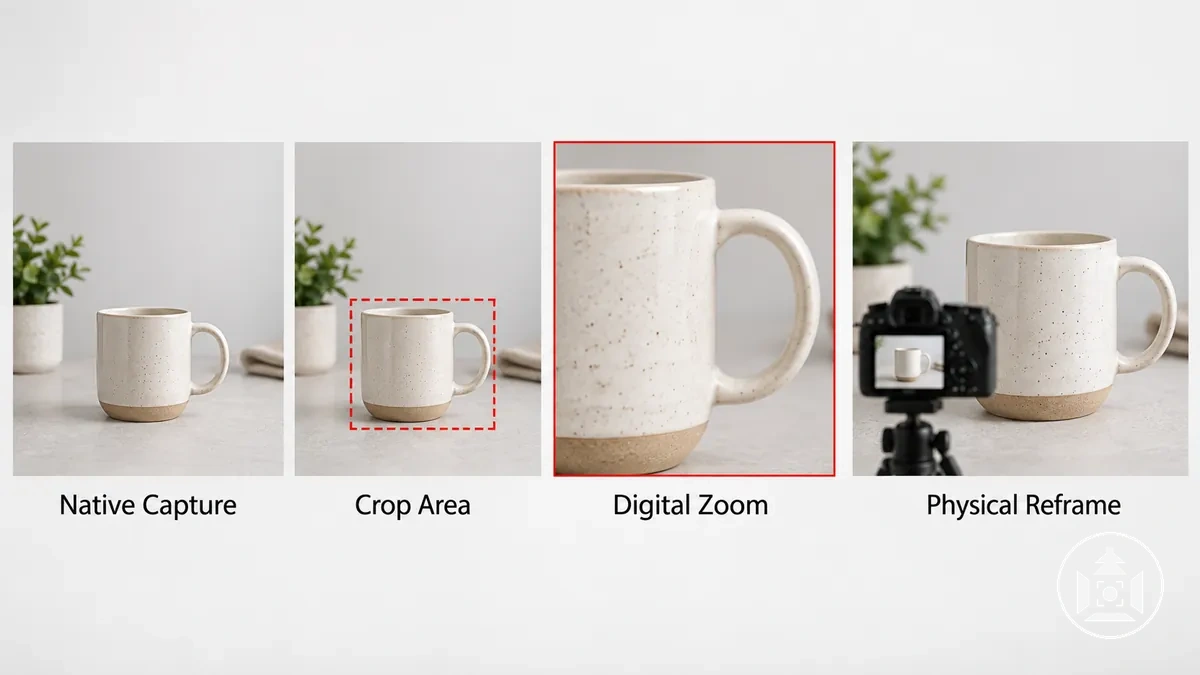
For example, if the same product can fill more of the frame by moving the device closer while maintaining the required composition and focus, more of the native capture can describe the product.
Relying on digital zoom for the tighter view instead uses a smaller captured area, leaving less original detail available for that reframing.
Sensor Size, Noise, Dynamic Range, and Computational Processing
Sensor size and image processing can affect usable product-image detail independently of nominal resolution.
For the same scene luminance, exposure time and lens f-number, a larger active sensor area can collect more total light, all else being equal; the visible result still depends on sensor efficiency, optics and processing. Sensor capability and processing then influence visible noise, dynamic range, and how detail is rendered in highlights and shadows.
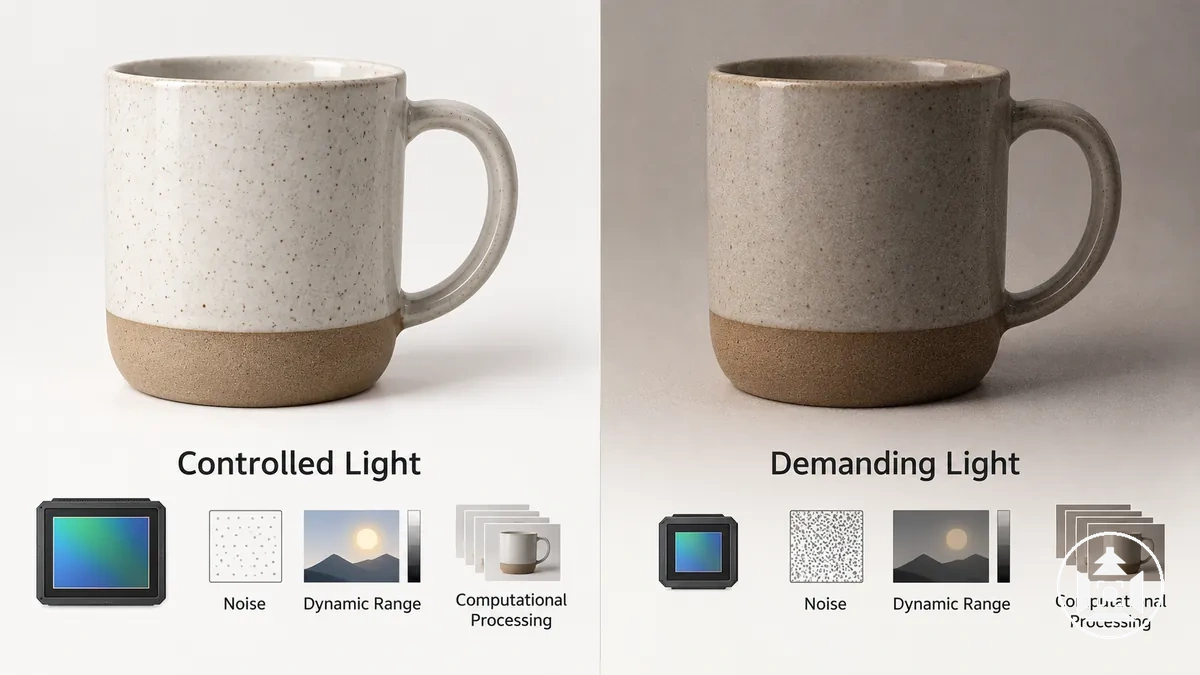
When available light is strong and controlled, both smartphones and dedicated cameras can receive enough light for noise and tonal limitations to become less conspicuous in the final product image.
Under more demanding lighting, differences in sensor capability and computational processing can become more visible because noise reduction, multi-frame processing, and tonal processing may change fine detail or the rendering of highlights and shadows.
Computational processing can therefore compensate for some capture limitations in particular conditions, but its effect on the finished image depends on the device, capture mode, subject, and processing method.
The following attributes connect the capture condition and sensor or processing behaviour to their main visible consequences for usable product-image quality:
- Sensor area: for the same scene luminance, exposure time and lens f-number, a larger active sensor area can collect more total light, all else being equal; the practical noise and detail result also depends on sensor design, optics and processing.
- Noise: when less usable light reaches the sensor, noise can become more apparent relative to the image signal, while noise-reduction processing can suppress visible noise but may also reduce the visibility of fine texture or detail.
- Dynamic range: the usable tonal span runs from shadow detail that remains distinguishable above noise to highlight detail that remains below clipping. More usable dynamic range preserves product information across bright and dark surfaces, while the final result still depends on exposure and processing.
- Computational processing: techniques such as multi-frame processing can combine information from multiple captures to influence noise, detail, and highlight or shadow rendering, with the resulting image depending on the device, capture mode, scene, and processing method.
A controlled-light versus demanding-light comparison of the same product can make this conditional relationship visible by showing how noise, fine detail, highlights, and shadows change as capture conditions place greater demands on the sensor and processing.
Control Over Exposure, Focus, and Optics
Smartphones and dedicated cameras can both provide capture control, but the amount and type of exposure control, focus control, and optical flexibility differ by device and configuration.
Manual control is not inherently better; it becomes useful when the photographer needs to hold a deliberate capture decision across multiple product images.
Smartphones often combine automated processing with controls exposed by the phone model and camera app, while dedicated cameras commonly provide direct control through the camera body and compatible lens system.
For ecommerce product photography, consistent exposure adjustment can support repeatability across a catalogue, while repeatable focus control helps keep the intended product area sharp from one capture to the next.
Perspective is determined by camera position relative to the product. Focal length changes framing and the working distance needed for a given composition, so changing focal length can change perspective indirectly when the photographer repositions the camera; lens choice and aperture availability can also affect depth of field.
The practical difference is therefore how reliably each device lets the photographer select and retain the required capture variables, rather than whether the device offers manual control in name alone.
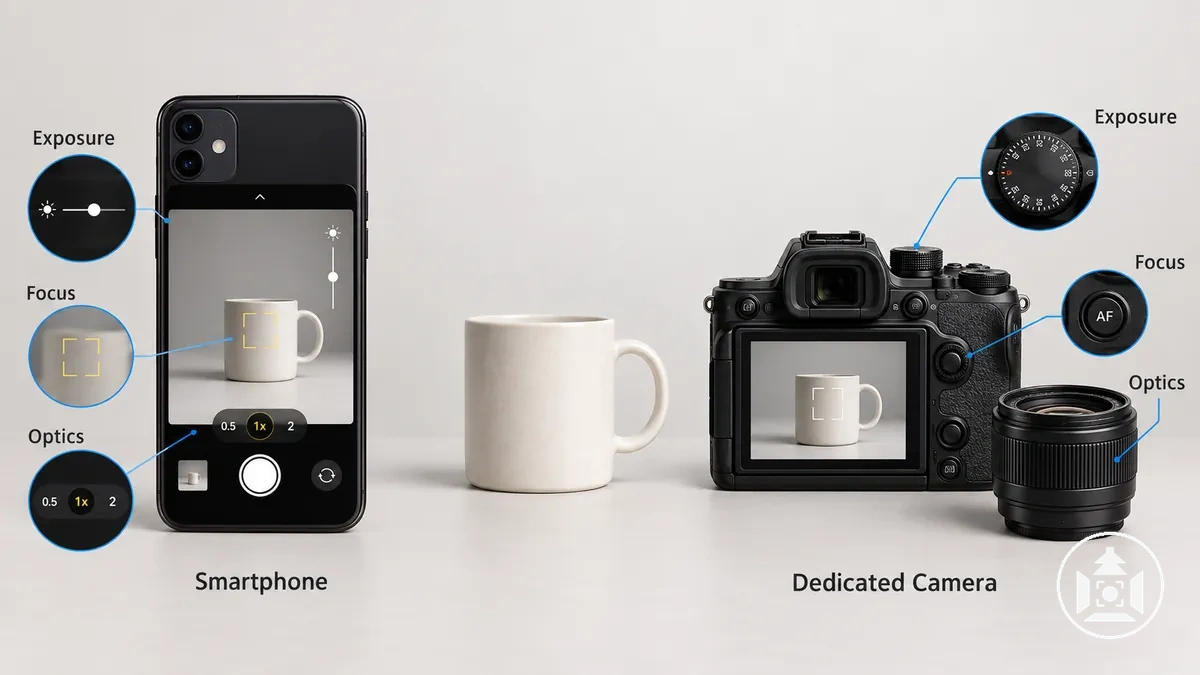
The comparison below organises exposure, focus, optical choice, and capture-output control across the two device classes, with each dimension tied to its practical consequence for predictable product images.
| Control dimension | Smartphone | Dedicated camera | Practical consequence |
|---|---|---|---|
| Exposure control | Exposure adjustment, exposure lock, and manual control of variables such as shutter speed or ISO may be available depending on the phone model and camera app; aperture control depends on the device's camera hardware. | Available exposure controls depend on the camera body and lens, and can include direct adjustment of shutter speed, ISO, and aperture where the lens provides adjustable aperture. | Holding the same exposure decisions across products can improve capture consistency and repeatability when lighting remains comparable. |
| Focus control | Tap focus, focus lock, or manual focus may be available depending on the phone and camera app. | Autofocus selection, focus locking, and manual focus availability depend on the camera body and attached lens. | Repeatable focus control helps keep the intended product feature or plane of focus consistent across a series. |
| Optics and focal length | Lens choice is limited to the physical camera modules and focal-length options provided by the smartphone, with availability varying by model. | Interchangeable-lens cameras can use compatible lens choices and focal lengths, while fixed-lens cameras remain limited to their built-in optics. | Optical flexibility provides more ways to choose framing, working distance and depth of field. Perspective itself follows camera position relative to the product, so position should be controlled when geometry must remain consistent. |
| RAW or less-processed capture | RAW or another less-processed capture option may be available depending on the smartphone, camera app, and capture mode. | RAW and processed capture options depend on the camera body and selected file format. | Access to RAW or another less-processed capture option can provide more flexibility over how image data is processed for a consistent catalogue workflow, but it does not replace correct exposure, focus or lighting. |
Exact capability therefore needs to be checked against the specific smartphone, camera app, camera body, and lens system rather than assumed from the device class alone.
The image below clarifies how exposure, focus, and optical choices are accessed and helps separate software-accessible controls from physical camera-system capabilities.
Smartphone Automation and Manual-Control Limits
Smartphone automation reduces capture friction by handling functions such as automatic exposure and computational processing, but some capture controls remain abstracted, limited, or dependent on the phone and camera app.
This can be sufficient when shooting conditions are stable, while repeatable product photography may require controls that can be deliberately selected or locked.
Software controls can expose functions such as focus lock, exposure lock, or manual mode where the device and camera app support them, but software does not remove hardware limits imposed by the phone's sensor, lens system, or aperture design.
For repeatability, the practical distinction is whether a capture variable can be selected and held consistently or remains under automatic behaviour.
The image below separates software-accessible controls from physical camera-system constraints so these two types of limitation are not treated as equivalent.
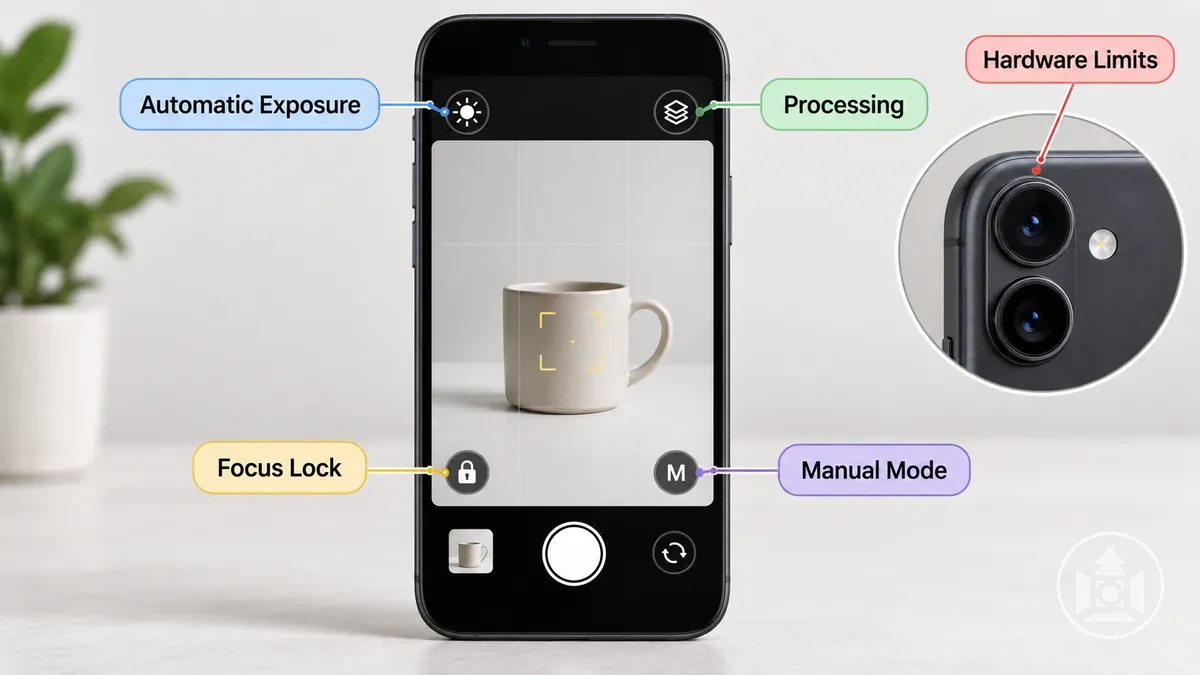
The main smartphone camera control categories move from automated software behaviour to physical hardware limits:
- Automatic exposure and processing: smartphone automation can select exposure behaviour and apply computational processing with little photographer input, improving convenience but leaving some capture decisions under automatic control.
- Focus and exposure locking: focus lock and exposure lock, when supported by the phone and camera app, can hold selected focus or exposure behaviour instead of allowing it to be recalculated for every composition, which can improve consistency across similar product images.
- Manual or pro-mode controls: manual mode may expose controls such as shutter speed and ISO where supported, but the available controls depend on the smartphone, camera app, camera module, and capture mode.
- Physical camera-system constraints: software controls cannot override hardware limits such as the phone's available sensors, physical lenses, or aperture design, so optical and exposure flexibility remains bounded by the device's camera hardware.
For example, smartphone automation may be sufficient for a product photographed repeatedly under stable lighting and framing.
If products or shooting conditions change and the photographer needs the same capture behaviour to remain fixed, model-dependent locks or manual controls can become more important, while physical camera-system limits remain unchanged by the camera app.
Dedicated Camera Manual Controls and Lens Flexibility
A dedicated camera commonly provides direct manual exposure, focus control, and optical controls, with the exact capabilities determined by the camera body and attached lens.
These controls can support repeatable capture because important exposure, focus, and framing decisions can be deliberately selected rather than left entirely to automatic behaviour.
Manual exposure can hold decisions such as shutter speed, ISO, and aperture where the camera and lens support those controls, helping maintain a repeatable exposure under comparable lighting.
For repeatable work, choose exposure values from the actual lighting, required depth of field, and intended product rendering. Keep shutter speed, ISO, aperture, or exposure compensation fixed only while those conditions and the exposure target remain unchanged; use the camera settings for product photography guide to select and lock the available controls.
Focus control can help keep the intended product area consistent, while aperture and lens choice provide flexibility over depth of field, framing and working distance. Camera position relative to the product remains the direct determinant of perspective.
RAW or another less-processed capture option, where supported, can preserve more flexibility for later processing, but the file format does not make the photograph inherently better without suitable exposure, focus, lighting and processing.
- Manual exposure: direct control of shutter speed, ISO, and aperture where supported allows selected exposure variables to remain fixed across comparable product captures, improving consistency when lighting is controlled.
- Focus control: selectable autofocus behaviour, focus locking, or manual focus where supported can keep the intended product position or plane of focus consistent across a series.
- Aperture control: when the attached lens provides an adjustable aperture, the photographer can control aperture as part of exposure and depth-of-field decisions rather than relying on a fixed physical aperture.
- Focal length and lens choice: compatible lenses and focal lengths change framing, working distance options and depth-of-field choices; camera position directly determines perspective, so position should remain consistent when product geometry must match across a series.
- RAW or less-processed capture: when the camera supports RAW or another minimally processed file format, it can retain more flexibility for later processing; the available data and processing latitude depend on the specific camera and format.
For a repeatable multi-product shoot under controlled conditions, fixing suitable exposure and focus decisions while keeping camera position and optical choices consistent can reduce capture-to-capture variation.
A simple one-off product image may not require the same degree of manual and optical control, and having advanced controls does not by itself produce a better photograph without suitable lighting, technique, and capture conditions.
Practical Trade-Offs in Setup, Stability, and Repeatability
Smartphones and dedicated cameras differ operationally less by whether they can capture a product image and more by how much setup effort, stability, and repeatable control the workflow requires.
A smartphone can reduce shooting friction through a compact device and fast capture process, while a dedicated camera can make mounting, framing, and repeated capture decisions easier to standardise when the equipment remains fixed.
Neither approach is inherently better; the practical trade-off changes with production volume and the consistency required across the product catalogue.
Setup effort includes preparing the device, mounting it securely, confirming framing, and managing the files produced during the shoot.
A compact smartphone workflow can be convenient for straightforward captures, while a dedicated camera setup may involve more equipment but can support stable positioning and repeatable capture over longer sessions.
Use a support that holds the device securely in the intended position for the full shooting sequence; the appropriate stand, mount and working surface depend on the product size and working position. See the ecommerce photography setup guide for those implementation choices.
Capture speed and file handling also depend on the device, transfer method, file format, and production process, so convenience should be evaluated against the need to reproduce the same decisions across multiple products.
| Workflow attribute | Smartphone | Dedicated camera | Operational trade-off |
|---|---|---|---|
| Setup effort | A compact device can reduce the amount of equipment required for a straightforward product shoot, particularly when the phone is already configured for the task. | A camera body, lens, support, and associated accessories can require more preparation before capture. | Lower setup effort can reduce friction for small jobs, while a more deliberate setup can support repeatable positioning during longer production runs. |
| Mounting and stability | Stable mounting is possible with a suitable phone support, but the mounting system must hold the device in the intended position throughout repeated captures. | Dedicated cameras can be mounted on compatible supports that keep the camera position and framing fixed across a sequence. | Stable mounting reduces unintended framing changes and helps preserve consistent camera position across products. |
| Capture speed | Automation and a simple capture interface can reduce the number of capture decisions required for individual images when conditions remain straightforward. | Capture can involve more deliberate control checks, while fixed settings and positioning can reduce repeated decision-making during a structured shoot. | Convenient individual capture can suit smaller jobs, while repeatable fixed decisions can become more valuable as production volume increases. |
| File handling | Files can remain within a mobile workflow or be transferred to another system, with the handling effort determined by file format, storage, transfer method, and production process. | File handling is determined by the camera's supported storage and transfer methods, selected file format, and the wider production workflow. | The practical choice is the file path that fits the production process without unnecessary handling steps. |
| Repeatability | Repeatability depends on keeping mounting, framing, exposure behaviour, focus behaviour, and processing sufficiently consistent across products. | Fixed camera position, selected capture controls, and stable optical choices can make repeated framing and capture decisions easier to standardise. | Repeatability becomes more important when many product images need consistent framing and capture behaviour. |
For a small batch of straightforward products, the lower setup effort and capture convenience of a smartphone may outweigh the benefit of a more controlled camera workflow.
For a larger catalogue requiring the same framing and capture decisions across many items, repeatability can become a stronger priority; maintaining consistent product photos then becomes more important than minimising setup effort alone.
Choosing Between a Smartphone and Camera by Shooting Situation
Choose between a smartphone and a dedicated camera according to the shooting requirements rather than treating either device class as universally better.
A smartphone can be suitable when required detail, cropping, control needs, lens flexibility, consistency, available light, and production volume remain modest and predictable.
As those demands increase, the additional capture control and repeatability available from a dedicated camera can become more useful, but equipment does not replace suitable lighting, stability, composition, or technique.
The decision should follow the conditions that materially affect the product image and workflow.
Greater required detail or heavier cropping increases the value of capture headroom, while more demanding exposure or focus control increases the value of deliberate manual control.
Lens flexibility matters when framing, working distance, or depth of field need to be managed consistently, while camera position should remain consistent when perspective and product geometry must match.
Available light affects how demanding the capture becomes, while production volume and consistency determine how important repeatable framing and fixed capture behaviour are across the product catalogue.
The following decision points organise the shooting situation by requirement and suitability rather than rank the devices:
- Required detail and cropping: if the final product image needs modest detail and little cropping, a capable smartphone can remain suitable under controlled conditions; heavier cropping or greater detail demands increase the value of additional capture headroom.
- Exposure and focus control: if automatic behaviour or basic locks provide sufficient consistency, smartphone control may be adequate; if exposure or focus decisions need to remain deliberately fixed across changing products or conditions, dedicated-camera control becomes more valuable.
- Lens flexibility: if the built-in focal-length options provide suitable framing from the required camera position, a smartphone can remain practical; if the shoot requires broader lens choice, a different working distance, or tighter depth-of-field control, a dedicated camera offers greater optical flexibility.
- Available light: in strong, controlled light, practical differences between device classes can narrow; in more demanding light, sensor capability, processing behaviour, and direct capture control can increase the usefulness of a dedicated camera.
- Repeatability: if only a few straightforward products need to be photographed, modest variation in framing or automated behaviour may be acceptable; if many products need consistent framing and capture decisions, stable manual controls and mounting become more important.
- Production volume: a low-volume shooting situation can favour the convenience of a smartphone workflow, while higher production volume increases the value of a repeatable capture process that reduces decision changes between products.
Suitability therefore shifts with the shooting situation rather than with device status alone.
A modern smartphone can cover many controlled, modest-output ecommerce tasks, while a dedicated camera becomes increasingly useful when detail, cropping, control needs, lens flexibility, available-light demands, consistency, or production volume require more deliberate and repeatable capture decisions.
When a Smartphone Is Usually Sufficient
A smartphone is usually sufficient for ecommerce product photography when the product can be photographed in controlled light, the final image needs only modest cropping, and the shooting situation does not depend on specialised optical control.
Under those conditions, the phone can provide enough usable detail and convenience without a dedicated camera adding a capability that materially changes the required result.
Controlled light, stable support, and predictable framing keep the capture conditions more consistent, while modest crop demand and moderate catalogue demands reduce the need for specialised optical or manual control.
A simple home shooting situation can therefore remain well suited to a phone when the product, background, lighting and camera position are easy to control. The same principles apply to product photography without a studio: stabilise the phone, control the light and background, and avoid relying on heavy digital enlargement.
The following situations commonly remain within smartphone capability because the missing camera-specific controls do not materially affect the required output:
- Modest detail and crop demand: the smartphone is suitable when the product image retains the required usable detail without aggressive cropping or digital enlargement.
- Controlled light: stable, sufficient lighting keeps the shooting conditions predictable, reducing the practical need for additional exposure or sensor flexibility.
- Stable support and predictable framing: when the phone can remain securely positioned and the product framing changes little between captures, repeatability does not depend on more elaborate camera controls.
- Straightforward products: products that do not require specialised focal lengths, unusual working distances, or precise depth-of-field control can remain within the phone camera's available optics.
- Moderate catalogue demands: a smartphone can remain sufficient when the number and variety of products do not require highly standardised manual capture decisions across changing shooting conditions.
The same phone-based approach becomes less suitable when lighting becomes more demanding, heavier cropping is required, specialised lens control matters, or the catalogue requires tighter repeatability across varied products.
When a Dedicated Camera Provides a Meaningful Advantage
A dedicated camera provides a meaningful advantage when the shoot requires more usable detail, greater crop headroom, stronger manual control, specialised lens flexibility, or highly repeatable capture across demanding products.
The advantage comes from the specific control or capture capability that solves those requirements, not from the camera category by itself.
Greater detail and cropping demands increase the value of capture headroom, while difficult lighting or changing products can make repeatable exposure and focus decisions more important.
Lens flexibility can matter when framing, working distance, or depth of field must be controlled more deliberately, while a consistent camera position is the key requirement when perspective and product geometry must match.
For repeated catalogue work, fixed manual control and stable optical choices can also make the same capture decisions easier to reproduce across many products.
The following situations show where a dedicated camera can provide practical value because a particular capability matches a demanding shooting requirement:
- Crop-sensitive images: when the final output requires substantial cropping while retaining fine product detail, greater usable detail and crop headroom can provide more flexibility before important texture or edges deteriorate.
- Difficult light or fixed capture decisions: when available light is demanding or exposure and focus must remain deliberately controlled, manual control can make those capture decisions easier to reproduce across changing products or conditions.
- Fine surface detail: when small textures, material finishes, labels, or product features must remain clearly resolved, additional usable detail and controlled capture conditions can become more valuable.
- Controlled perspective and product geometry: when product proportions must look consistent, keep the camera position and viewpoint consistent; broader lens choice can then help obtain the required framing and working distance without using digital enlargement.
- High-volume repeatable capture: when many demanding products must be photographed with consistent framing, exposure behaviour, focus, and optical choices, stable manual control can make repeatable capture easier to standardise.
The practical advantage is therefore requirement-dependent rather than universal.
A dedicated camera becomes meaningfully useful when its additional capture headroom, manual control, or lens flexibility solves a real detail, perspective, lighting, or repeatability requirement that would otherwise constrain the shoot.