
Diagnosing Color Accuracy Problems in Ecommerce Product Photos
Diagnose ecommerce product photo color shifts by finding the first reproducible mismatch in this sequence: capture → edited master → exported file → controlled viewing. A mismatch that first appears in capture points to capture conditions such as lighting, reflections, or white balance; one that first appears during editing or export points to processing or profile handling; and a mismatch limited to one viewer or display points to the viewing environment rather than proving that the image file is wrong.
Diagnostic path
Find where the color shift starts
Compare one stage at a time under controlled conditions. Stop at the earliest stage where the product appearance or reference first shows a reproducible mismatch.
-
1 · Capture
Original capture already differs: investigate the illumination, reflected color, and white-balance reference before editing.
-
2 · Edited master
Capture matches, but the edit differs: investigate the processing or color correction introduced during editing.
-
3 · Exported file
Edit matches, but export differs in the same controlled viewer: investigate export settings, color-space conversion, and ICC profile handling.
-
4 · Viewing
The same exported file differs only by viewer or display: investigate calibration, the active monitor profile, application color management, and ambient viewing conditions.
Decision rule: correct the first confirmed stage, verify the result, and only then continue downstream.
Assess color accuracy against the physical product under controlled illumination, using a neutral reference to establish white balance rather than treating an uncontrolled screen as the sole color reference.
Comparing the same ecommerce product photo and neutral reference across capture and processing/export helps distinguish a mismatch recorded or encoded in the image from one that appears only under particular viewing conditions.
A color cast, saturation shift, or post-export mismatch is therefore a diagnostic signal that requires confirmation at the stage where it first appears.
An image file can remain internally consistent while its displayed color differs in an uncontrolled viewing environment, so color accuracy does not mean identical appearance on every device or viewer.
Diagnosis should focus on where observable color differences first emerge and whether they follow the image file or only the viewing condition before corrective work begins.
Table of Contents
Signs of a Color Accuracy Problem in Ecommerce Product Photos
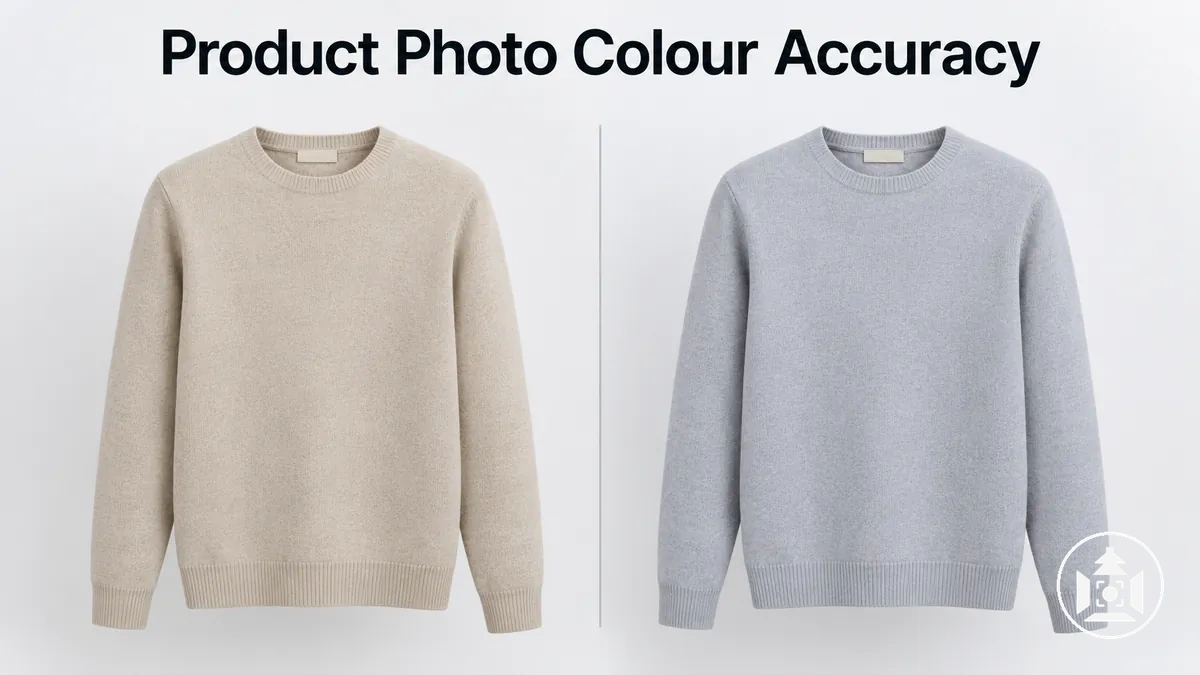
Color casts, product-specific hue changes, saturation or brightness shifts, post-export changes, and viewer-specific differences are diagnostic signals of a possible color mismatch, not confirmed causes.
Where the visible shift appears helps narrow the stage that warrants checking.
The image below illustrates a neutral reference beside modest color cast and product-color shift states so the visible symptoms can be recognised without assigning them to a specific cause.

| Signal | Where It Appears | Stage to Check | What It Does Not Prove |
|---|---|---|---|
| Whole-image color cast, such as a warm, cool, green, or magenta unwanted tint | Across the product and other neutral or expected-color areas in the image | Check the image from capture onward to find the first stage where the cast is visible | A global cast does not establish which capture or processing condition produced it |
| Product-specific hue shift | The product color differs from the neutral reference while other parts of the image may appear plausible | Compare the product appearance through capture and processing/export | A local hue shift does not confirm a single lighting, editing, or export cause |
| Unexpected saturation or brightness shift | The product appears more or less saturated, lighter, or darker than the reference | Check where the change first becomes visible between capture and the edited or exported image | The appearance alone does not identify whether the underlying issue is capture or processing |
| Post-export color change | The edited file appears as expected before export, but the exported image shows a visible shift | Check processing/export by comparing the pre-export and exported files under the same viewing conditions | A post-export change does not establish which export setting or color-profile condition is responsible |
| Viewer-specific display difference | The same exported image appears different in a particular display or viewer while remaining consistent elsewhere | Check the viewing environment and color-managed viewing conditions | A display difference does not establish that the exported image file itself contains the color error |
These patterns should remain separate from defects such as blur, poor sharpness, noise, or insufficient resolution, which affect image attributes other than product color accuracy.
A technically valid image file can still reproduce product color inaccurately, while a display difference can occur without establishing a file-level error; confirmation therefore requires checking where the color symptom first appears.
What Causes Color Shifts in Ecommerce Product Photos
Color shifts in ecommerce product photos can originate from capture conditions, processing/export, or the viewing environment, and similar visible shifts can arise from different domains.
Separating these origin classes helps distinguish a change recorded or encoded in the image from a difference that appears only when the image is viewed.
The image below separates the capture, export, and display stages along one product-image path to show where color can change or appear different without treating any stage as a confirmed cause.

At capture, lighting and white balance can affect the recorded color when the illumination or camera interpretation differs from the intended product appearance.
During processing/export, editing choices, color-space conversion, color profile handling, or export behavior can change how color is encoded in the resulting file.
During viewing, display characteristics and application color management can change the displayed color without necessarily changing the exported image itself.
The first two domains can therefore produce a file-level color change, while the viewing environment can produce an appearance difference that is specific to a display or viewer.
Mixed Lighting, Reflections, and Incorrect White Balance
Mixed lighting and reflected color can shift recorded product color because the light reaching the product may differ across the scene in color temperature, spectrum, or bounced tint.
Window light combined with artificial light can create different illumination zones, while a nearby colored surface can reflect tinted light onto a limited part of the product.
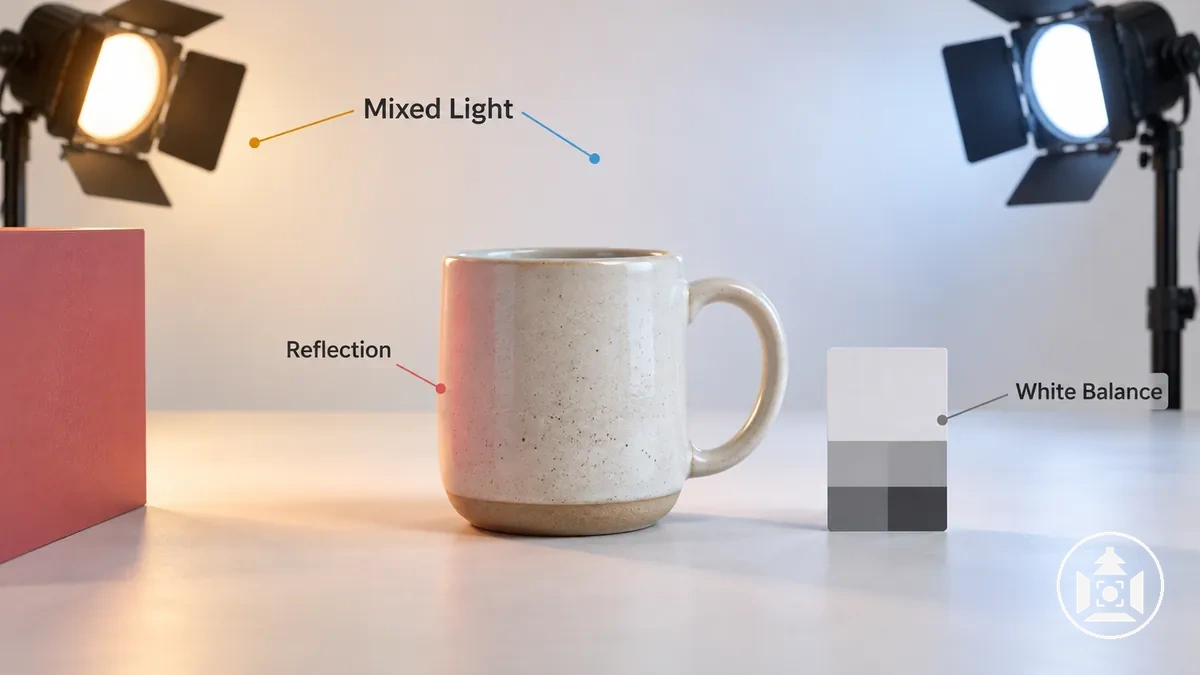
- Mixed lighting: Light sources with different color characteristics can illuminate separate areas of the product differently, producing uneven warm or cool casts; variation that follows illumination zones indicates that mixed light sources may be contributing to the recorded color shift.
- Reflected color: Light bouncing from a colored nearby surface can introduce an unwanted tint where that reflected light reaches the product, producing a local cast; contamination confined to a particular surface or side of the product points more strongly toward a localized reflection than a scene-wide shift.
- Incorrect white-balance reference: White balance interprets color temperature and tint relative to a neutral reference; when that reference is unsuitable for the illumination, the recorded image can develop a broader warm, cool, green, or magenta cast, making a consistent global cast more indicative of a white-balance or scene-wide illumination issue.
White balance can therefore shift recorded color across much of the image when its neutral reference does not represent the relevant illumination, whereas reflected color is more likely to remain localized to surfaces receiving the bounced light.
A global cast affecting both the product and neutral reference consistently differs diagnostically from a local cast confined to one product area.
The direction and magnitude of either cast can vary with the light spectrum, surface reflectance, camera response, and geometry.
The visible pattern narrows the capture condition to investigate. There is no single correct white-balance color temperature for every light source; use a neutral reference under the same illumination to set or verify white balance, then check whether the cast remains.
Editing, Color Profiles, and Export Changes
An ecommerce product image can look acceptable during editing yet appear different after export because its color values and the color profile used to interpret those values are distinct parts of color management.
An export operation can convert encoded color into another color space, while a receiving application can also display the exported file differently if it handles the profile differently.
A visible post-export difference therefore does not by itself establish that the underlying color values changed.
The image below illustrates an edited-file state and an exported-file state with profile handling as the relevant variable, while showing a modest color difference only as a possible outcome rather than a guaranteed export defect.
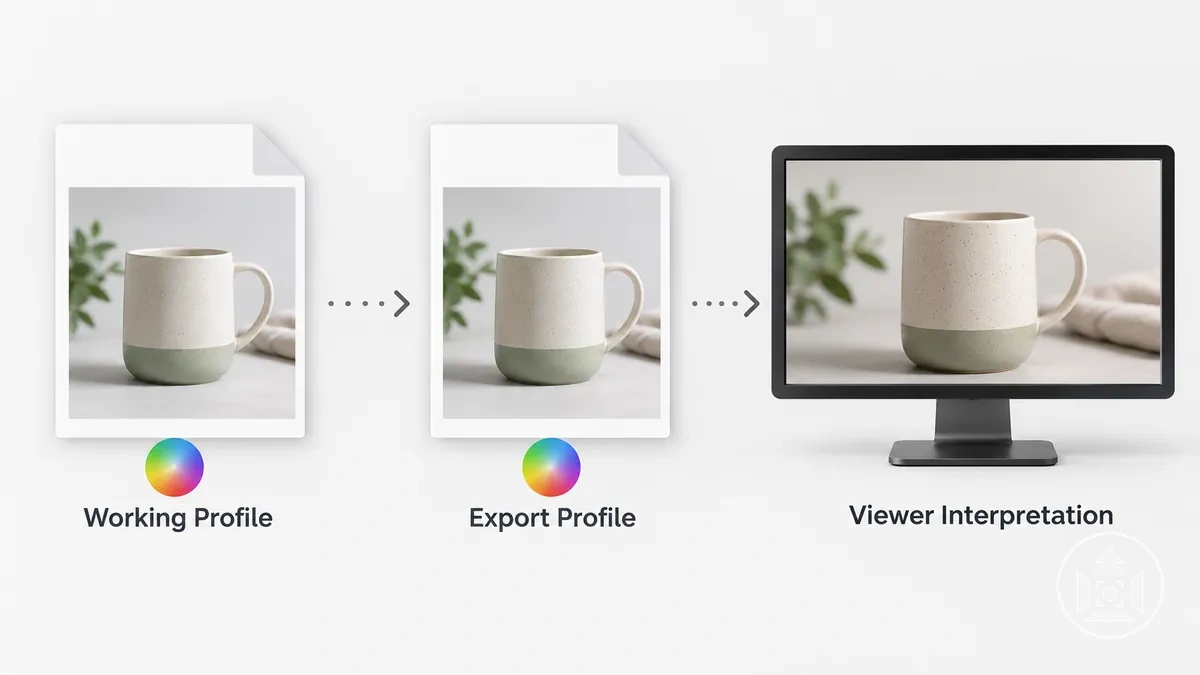
A working color space defines how color values are represented during editing, while the export color space defines the intended representation in the exported file.
Profile conversion recalculates color values for a destination color space while seeking to maintain their intended appearance, whereas profile assignment associates existing color values with a profile without performing that conversion.
An embedded profile identifies the color interpretation associated with the file, but the displayed result can depend on whether the receiving application uses that profile through color management.
For web delivery, sRGB with an embedded sRGB ICC profile is a broadly compatible output state; converting to sRGB and embedding the profile reduces interpretation ambiguity, but it does not make every viewer or display appear identical.
The following states separate changes to encoded color from differences caused by interpretation:
- Color-space conversion: Profile conversion can recalculate encoded color values for the export color space, making the export operation itself a possible source of a file-level difference.
- Incorrect profile assignment: Profile assignment changes how existing color values are interpreted rather than converting them, so assigning a profile that does not describe those values can produce an unintended appearance.
- Missing or ignored embedded profile: If the intended embedded profile is absent or not used, another application may interpret the file under a different color assumption, creating a visible difference without establishing that export changed the underlying color values.
- Viewer color management: A color-managed viewer can use the available image profile when interpreting the file, while different viewer behavior can make the same exported file appear different without a further file-level change.
For example, an edited product image may look consistent in its working space but appear different after export in another viewer.
If export performed a profile conversion, the difference may involve the exported file's encoded color; if the same exported file differs only between viewers, the mismatch can instead reflect how the embedded profile is interpreted.
Monitor Calibration and Color-Managed Viewing Differences
An unchanged product image can appear to have the wrong color when display-side color interpretation is unreliable.
Monitor calibration, the active monitor profile, and application color management affect how image color is presented, while the source file itself can remain unchanged.
A mismatch confined to one display or viewer therefore suggests a viewing-side issue rather than proving that the image file requires a color change.
The image below keeps the source product image constant while comparing controlled color-managed viewing with an unmanaged or misconfigured viewing context, illustrating a restrained appearance difference without identifying either display as universally correct.
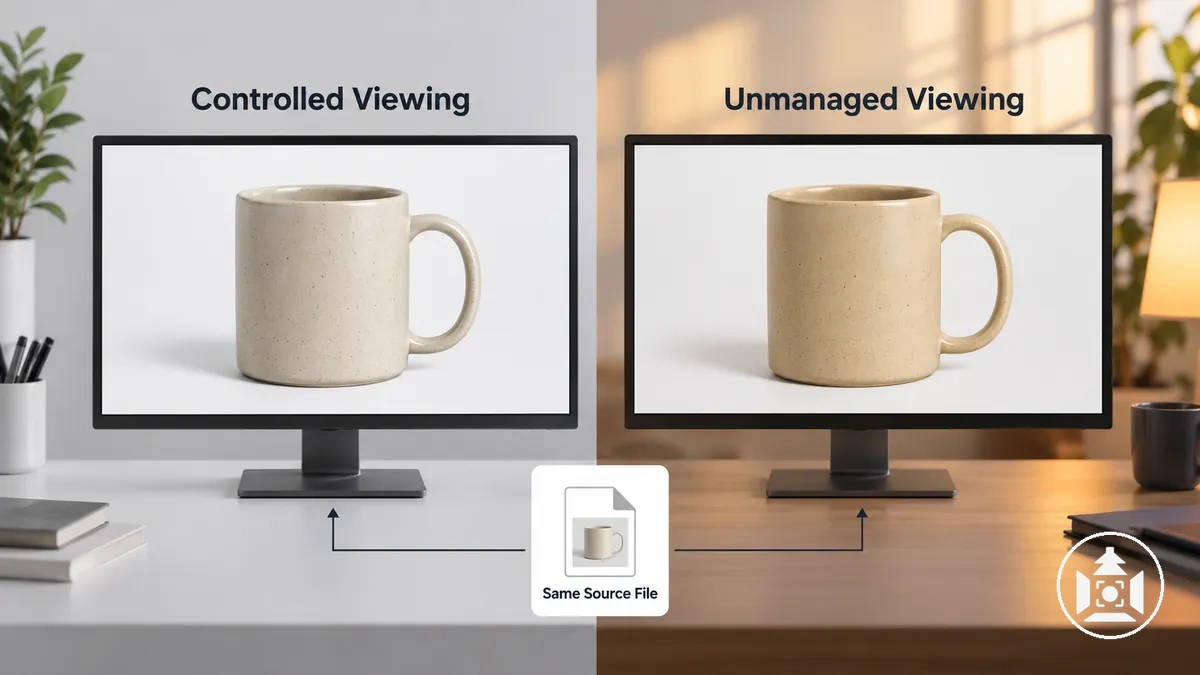
Viewing reliability depends on several distinct conditions rather than one universal calibration target.
The criteria below separate display and application behavior from the unchanged source file so a visible difference can be interpreted without prescribing fixed white-point, gamma, brightness, or recalibration values.
- Monitor calibration and profile: A display's calibration state and monitor profile influence its displayed color; an unsuitable or inconsistent state can alter perceived color and makes that display less reliable as evidence that the source file is wrong.
- Application color management: A color-managed viewer can use available profile information when interpreting image color, while an unmanaged or misconfigured application can produce a different displayed appearance from the same file.
- Display brightness and ambient light: Display brightness and surrounding ambient light affect perceived brightness, contrast, and color relationships under the viewing condition without changing the image data.
- Cross-viewer consistency: A mismatch confined to one suspect viewing environment points more strongly toward display-side interpretation, whereas a mismatch reproduced across controlled color-managed viewing environments provides stronger reason to investigate the source image rather than one viewer alone.
Controlled viewing does not require every device to look identical, nor does monitor calibration guarantee objective correctness under every condition.
The key diagnostic boundary is whether the appearance difference follows one display or application or remains reproducible when the same file is viewed under multiple controlled, color-managed conditions.
How to Trace Where the Color Shift Begins
Trace the color shift through the original capture, edited master, exported file, and controlled viewing in that order, locating the first stage where a known product color or neutral reference stops matching.
The earliest reproducible first mismatch is the strongest clue to the failure stage, although it localizes where the deviation appears rather than guaranteeing its underlying cause.
Use the same reference state and keep relevant viewing conditions as controlled as practical at each comparison point.
Compare the original capture with the reference first, then compare the edited master with the original and reference, the exported file with the edited master, and finally the same exported file across controlled viewing conditions.
Hold other relevant conditions constant as practical so each comparison isolates one stage rather than introducing several variables at once.
A match moves the diagnosis forward to the next comparison point, while a new reproducible difference identifies the stage that warrants the next diagnostic decision.
- Original capture versus reference: Compare the original capture with the known product color or neutral reference. If the deviation is already present, the first mismatch is at capture and capture conditions warrant stage-specific investigation; if they match, continue to the edited master.
- Edited master versus original/reference: Compare the edited master with both the original capture and reference state. A new deviation that was absent from the original localizes the first mismatch to processing; if the relevant color remains consistent, continue to the exported file.
- Exported file versus edited master: Compare the exported file with the edited master under the same controlled viewing condition. A difference appearing only after export points to the export stage for the next check; no reproducible difference means the comparison should continue to viewing.
- Exported file across controlled viewing conditions: Compare the same exported file in controlled viewing environments. If its appearance differs between viewers or displays while the file remains the same, the next diagnostic decision is to investigate viewing-side interpretation; if the mismatch remains reproducible across controlled viewing conditions, return to the earliest preceding comparison point where that mismatch is also present.
A difference at one checkpoint changes the diagnostic decision by stopping the forward trace at the earliest reproducible deviation, while a match moves the comparison to the next stage.
Isolate that failure stage before changing the image because a similar visible shift can originate at different points in the image path.
Subjective memory of product color is not a stable reference. Use the physical product under controlled light, a neutral target, or a known color target so a new deviation can be distinguished from an earlier one.
Check the Original Capture Against a Neutral Color Reference
Compare the original capture with a neutral reference, such as a grey card, photographed under the same lighting as the product to determine whether a capture-stage cast is already present.
A deviation in the neutral reference can support a diagnosis of illumination or white balance behaviour, but agreement with the reference does not guarantee exact reproduction of every product color.
Each check below controls a condition needed for a fair neutral-reference comparison, linking the observed neutrality or deviation to its capture-stage diagnostic implication.
- Reference under the same light: The grey card or neutral target must receive the same relevant illumination as the product; a reference photographed under different light cannot reliably represent the product's capture condition.
- Reference placement appropriate to the product light: Position the reference where it represents the illumination reaching the product; a neutral result from a differently illuminated position does not rule out a product-area cast.
- Exposure sufficient for useful comparison: Check that exposure preserves enough usable tonal information in the reference for its neutrality or deviation to be assessed; an inadequately recorded reference requires confirmation before its apparent color is used diagnostically.
- White-balance interpretation checked: If the neutral reference shows a consistent unwanted tint in the original capture, that deviation suggests the recorded illumination or white-balance interpretation warrants investigation; a neutral-looking reference makes a scene-wide white-balance cast less strongly supported.
- Product and reference cast direction compared: If the product and neutral reference show a similar cast direction under the same lighting, a shared capture condition is more strongly supported; if the reference remains neutral while the product alone deviates, product-specific reflected color or surface behaviour requires separate confirmation.
A neutral reference is strongest for diagnosing illumination and white-balance behaviour. A grey card verifies neutrality, not the accuracy of every hue; for broader color accuracy, use a target with known color patches or the physical product under controlled light, especially when reflective surfaces receive surrounding color contamination.
Deeper white balance and camera settings evaluation belongs outside this capture check once the original-capture deviation has been localized.
Compare the Edited File With the Exported File
Compare the edited master with the exported file in the same viewer on the same display under color-managed viewing conditions.
Keeping the viewing environment constant makes the file state the variable being tested, so an appearance difference that first appears in the export points to the export stage rather than automatically to later viewing.
Do not change the edit while performing the comparison, because that would introduce another variable between the edited master and exported file.
Keep the viewer, display, and relevant viewing conditions constant, then check whether the export used the intended export profile and whether profile conversion occurred as expected.
Confirm that the embedded profile associated with the output is consistent with the intended export state without assuming that the file format itself explains the shift.
If the edited master matches the reference but the exported file differs in this controlled comparison, export settings or profile handling require investigation.
If the same exported file changes appearance only after moving to another application or display, the evidence instead points toward viewing-dependent interpretation.
| Compared State | Keep Constant | Observed Result | Diagnostic Interpretation |
|---|---|---|---|
| Edited master versus exported file | Same viewer, same display, and same color-managed viewing conditions | Both files match | No export-stage appearance change is reproduced in this controlled comparison, so continue the diagnosis beyond export. |
| Edited master versus exported file | Same viewer, same display, and same color-managed viewing conditions | Edited master matches the reference, but the exported file differs | The first mismatch appears after export, pointing to export settings, export profile, profile conversion, or related profile handling for investigation. |
| Same exported file across different viewers | Exported file remains the same | Appearance differs only between applications or displays | The difference is viewing-dependent and points toward viewer or display interpretation rather than establishing an export-stage defect. |
A mismatch reproduced between the edited master and exported file in the same controlled viewer localizes the next diagnostic check to export handling; a difference that appears only in another viewer does not provide the same evidence against the exported file.
Once an export-stage cause has been isolated, detailed correction belongs in the dedicated editing product photo colour context rather than in this diagnostic comparison.
Keep the original edited master unchanged during that diagnosis so any later correction does not obscure where the first mismatch occurred.
Verify the Display Before Recorrecting the Image
Verify the viewing system before correcting the source image again, because an inaccurate or unmanaged display can make a correct file appear color-shifted.
A mismatch confined to one unmanaged or suspect viewing setup does not by itself justify recorrection; the same exported file should first be checked under controlled viewing conditions.
The verification should cover monitor calibration and monitor profile status, behavior in a color-managed application, display brightness relative to the environment, stability of ambient light, and viewer consistency.
These conditions establish whether the viewing setup is sufficiently controlled for a useful comparison.
Calibration or profile uncertainty makes a display-side interpretation more plausible, while consistent behavior in a color-managed application strengthens confidence in the viewing result.
Brightness or ambient-light changes that materially alter perception make that viewing condition less reliable for deciding whether to edit the file.
The final verification is whether the same exported file behaves consistently on another controlled viewer.
- Monitor calibration and monitor profile: Verify that the calibration and active profile represent the display's current state. A stable, known condition supports using that display for comparison, while an uncertain or inconsistent state suggests that the apparent mismatch may belong to the viewing setup.
- Color-managed application: Check the file in a color-managed application. Consistent appearance supports the viewing comparison; a difference confined to an unmanaged application points to application-side interpretation and does not by itself support recorrecting the image.
- Display brightness: Check that display brightness is reasonable for the surrounding viewing environment. If the apparent problem changes substantially under an unsuitable brightness condition, the observation is less reliable evidence for changing the source image.
- Ambient light: Keep ambient light reasonably stable while judging the file. Stable surroundings support a more reliable comparison, whereas changing or strongly colored illumination weakens the recorrection decision.
- Same-file consistency across controlled viewers: Compare the same exported file on another controlled, color-managed viewing setup. If it behaves consistently across controlled viewers but differs on one unmanaged or suspect setup, the evidence points to display interpretation; if the mismatch is reproduced across controlled viewers, further investigation of the image file is more justified.
A mismatch reproduced across controlled color-managed viewers provides stronger support for another file-level check, whereas a mismatch confined to one unmanaged or suspect viewer points more strongly toward viewing behavior.
Consumer-device variation cannot be made fully identical in practice, so verification should rely on controlled consistency rather than repeated image edits made to compensate for one suspect screen.
Correcting Color Shifts After Diagnosis
Correct the first confirmed cause of the color shift, then verify the corrected result before changing anything else.
The appropriate corrective direction depends on whether the confirmed failure stage is the capture stage, processing/export, or the viewing stage, so unrelated corrections should not be stacked before the result is rechecked.
| Confirmed Stage | Check | Corrective Direction | Verification |
|---|---|---|---|
| Capture | Confirm that the shift is already present in the captured image or neutral reference under the relevant lighting. | Correct the diagnosed lighting or white-balance condition and reshoot when practical. | Compare the new capture with the product or neutral reference before proceeding. |
| Processing/export | Confirm that the edited or exported file is the first state where the mismatch appears under controlled viewing. | Adjust only the relevant color correction, export setting, or profile handling associated with that stage. | Recompare the corrected edited or exported file with the preceding reference state under the same viewer and display conditions. |
| Viewing | Confirm that the same file behaves consistently in controlled color-managed viewing but differs in the suspect viewing setup. | Correct the viewing condition through appropriate calibration, profile use, or color-managed viewing rather than altering the image unnecessarily. | Recheck the same file in controlled viewing to confirm whether file correction is warranted. |
At the capture stage, correction should remain limited to the diagnosed capture condition.
If the confirmed shift is associated with lighting or white balance, adjust that condition and reshoot when practical rather than compensating later for an error that already exists in the capture.
Compare the new capture with the product or neutral reference under the same relevant conditions to determine whether the shift is still reproduced.
If the reference still shows the same deviation, recheck the capture-stage condition before introducing processing changes.
For processing/export findings, adjust only the file-level correction or profile handling associated with the diagnosed stage and recheck the result before making another change.
If the viewing stage is confirmed instead, the corrective action belongs to the viewing environment, such as calibration or color-managed viewing, rather than automatically to the source image.
For example, the same visible cast can require a file correction when it first appears during processing but viewing-side correction when the exported file remains consistent in controlled viewing and differs only on a suspect display.
Keeping the corrective action within the confirmed stage prevents unrelated changes from obscuring whether the diagnosed cause was addressed.
After any correction, compare the corrected result again with the product or neutral reference under repeatable conditions and make further changes only if the diagnosed mismatch remains reproducible.
Once the correction has been verified, maintaining repeatable capture, processing, and viewing conditions supports consistent ecommerce product imagery across future images.